All code in this article was tested on DuckDB 1.5.4. The vector distance functions used (
list_cosine_similarity,list_distance) are built into DuckDB and need no extension. Vectors are modeled as aDOUBLE[4]array in the demo (4-dim for readability; in production swap toDOUBLE[1536]LLM embeddings — the SQL stays identical).
Why Agents Need a Memory Layer
In 2026, the bottleneck for shipping AI agents / bots has moved from “can it talk” to “does it remember you.” A genuinely useful agent must distinguish two kinds of state:
- Short-term memory: the current conversation’s context (message window, last few turns) — usually carried directly by the LLM’s context window.
- Long-term memory: facts, preferences, and skills that persist across sessions and must be stored externally, then recalled by relevance and injected into the prompt next time.
That persistent storage layer is exactly what this article builds. The classic design is “vector DB + relational DB” as two separate systems, with hand-written sync in between. DuckDB collapses both into one embedded analytics engine — the same table stores text metadata, vectors, and does similarity recall in SQL, which fits the agent-memory use case (small data, high query flexibility, frequent JOINs) perfectly.
The Four Stages of a Memory Layer
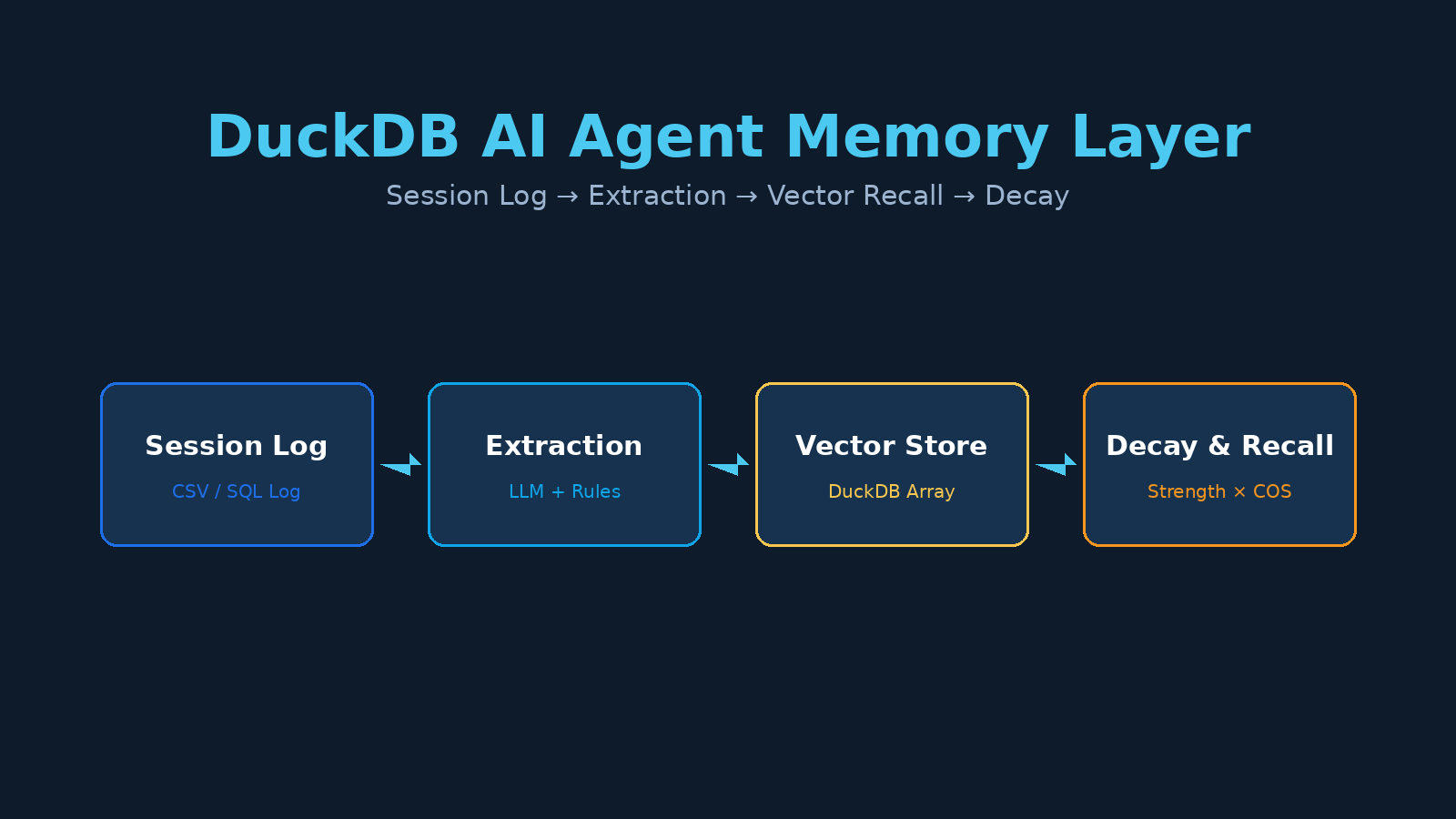
A production-grade agent memory layer has four stages (matching the four boxes in the diagram above):
| Stage | Responsibility | This article |
|---|---|---|
| 1. Session log | Raw interaction stream | session_log table |
| 2. Extraction | Convert dialogue to structured memories | rules / LLM |
| 3. Vector recall | Fetch top-k by relevance | built-in list_cosine_similarity |
| 4. Decay & consolidation | memories fade, reinforcement revives | strength field + time decay |
Here’s the runnable DuckDB code, stage by stage.
Stage 1: The Session Log Table
The session log is just a raw stream. In practice your bot framework (LangGraph, a custom loop, etc.) writes here after each turn.
CREATE TABLE IF NOT EXISTS session_log(
  session_id   VARCHAR,
  msg_seq      INTEGER,
  role         VARCHAR,   -- user / assistant
  content      VARCHAR,
  ts           TIMESTAMP
);

INSERT INTO session_log VALUES
 ('s1',1,'user','I prefer concise output, tables please','2026-11-08 10:00:00'),
 ('s1',2,'assistant','Noted, I will use tables',        '2026-11-08 10:00:05'),
 ('s2',1,'user','Analyzed sales data with DuckDB',        '2026-11-08 11:00:00'),
 ('s2',2,'user','Remember to use GROUP BY for aggregation','2026-11-08 11:00:02'),
 ('s3',1,'user','Deployed a Cloudflare Tunnel',           '2026-11-08 12:00:00');
Stage 2: Long-Term Memory Table + Extraction
The memory table adds three engineering fields that separate a real memory layer from a plain vector store:
kind: memory type (fact / preference / skill), lets you filter recall by type;strength: memory strength (0~1), the core of the decay model;access_count/last_accessed: access stats, driving “frequently-used memories stick harder.”
CREATE TABLE IF NOT EXISTS long_term_memory(
  memory_id    VARCHAR,                -- generated with uuid()
  kind         VARCHAR,               -- fact / preference / skill
  content      VARCHAR,
  embedding    DOUBLE[4],             -- demo 4-dim; production DOUBLE[1536]
  created_at   TIMESTAMP DEFAULT now(),
  last_accessed TIMESTAMP,
  access_count INTEGER DEFAULT 0,
  strength     DOUBLE DEFAULT 1.0
);

-- Extraction: in production an LLM bulk-extracts facts/preferences/skills
-- from session_log. For reproducibility we insert pre-extracted results.
INSERT INTO long_term_memory(kind, content, embedding, memory_id) VALUES
 ('preference','User prefers concise output, likes tables',[0.9,0.1,0.2,0.0], uuid()),
 ('fact','User has analyzed sales data with DuckDB',[0.1,0.8,0.3,0.1], uuid()),
 ('skill','User is familiar with Cloudflare Tunnel deploys',[0.2,0.1,0.9,0.0], uuid());
Production note: in a real system
embeddingcomes from an LLM (OpenAI / Gemini embedding API) at 1536 dims. ChangeDOUBLE[4]toDOUBLE[1536]; every SQL statement below is unchanged.
Stage 3: Vector Recall (Core)
Given a query vector, take the top-k most similar memories. DuckDB’s built-in list_cosine_similarity(a, b) computes cosine similarity between two arrays with no turbovec / no extension (verified on 1.5.4).
-- Query: simulate the embedding for "what output style does the user like"
WITH q(q, e) AS (VALUES ('output style preference', [0.85,0.15,0.20,0.05]::DOUBLE[4]))
SELECT m.kind, m.content,
       list_cosine_similarity(m.embedding, q.e) AS score
FROM long_term_memory m, q
ORDER BY score DESC
LIMIT 3;
Measured output (DuckDB 1.5.4):
preference | User prefers concise output, likes tables | 0.996
skill      | User is familiar with Cloudflare Tunnel deploys | 0.444
fact       | User has analyzed sales data with DuckDB | 0.351
The most relevant preference memory scores 0.996 and correctly ranks first.
Batched queries → multi-path recall
In production one agent turn often recalls several memory groups (different intents); do it all in one JOIN:
CREATE TABLE IF NOT EXISTS queries(q VARCHAR, e DOUBLE[4]);
INSERT INTO queries VALUES
 ('output style preference',[0.85,0.15,0.20,0.05]),
 ('what analysis done',    [0.10,0.80,0.30,0.10]),
 ('deploy tooling known',  [0.20,0.10,0.90,0.00]);

WITH ranked AS (
  SELECT q.q, m.content,
         list_cosine_similarity(m.embedding, q.e) AS sim
  FROM queries q, long_term_memory m
)
SELECT q, STRING_AGG(content, ' / ' ORDER BY sim DESC) AS top_memories
FROM ranked
WHERE sim > 0.4
GROUP BY q;
Sample output (measured on DuckDB 1.5.4, threshold sim > 0.4):
output style preference → User prefers concise output, likes tables / User is familiar with Cloudflare Tunnel deploys   (2 rows)
deploy tooling known    → User is familiar with Cloudflare Tunnel deploys / User has analyzed sales data with DuckDB / User prefers concise output, likes tables   (3 rows)
what analysis done      → User has analyzed sales data with DuckDB / User is familiar with Cloudflare Tunnel deploys   (2 rows)
Note: the demo has only 3 memories with very close vectors, so most queries recall 2–3 rows — this is a side effect of tiny data, not a broken threshold. In production, with a large, spread-out memory set, the 0.4 threshold genuinely filters unrelated noise; tune it against your real similarity distribution (look at the sim histogram first, then pick a percentile).
Stage 4: Memory Decay & Consolidation
The most overlooked stage that decides long-term usability. Two rules:
- Natural decay: as time passes since
created_at/last_accessed,strengthdecays exponentially (older unused = weaker). - Access consolidation: each recall bumps
strengthback toward 1.0 (frequently-used memories stick harder).
-- 1) Natural decay: for memories not accessed, strength decays by the age of last_accessed
--    30-day gap → 0.95^30 ≈ 0.215 (GREATEST floors at 0.3 to avoid zeroing out)
--    100-day gap → 0.95^100 ≈ 0.006 (still floored at 0.3)
-- In production run this in a scheduled job (e.g. daily at 2 AM)
UPDATE long_term_memory
SET strength = GREATEST(0.3,
                        strength * POWER(0.95,
                                          date_diff('day', last_accessed, now()))::DOUBLE)
WHERE last_accessed IS NOT NULL;   -- memories never accessed don't decay yet (or use created_at instead)

-- 2) Access consolidation: memories hit in this recall round bump back toward 1.0
UPDATE long_term_memory
SET access_count  = access_count + 1,
    last_accessed = now(),
    strength      = GREATEST(0.3, strength * 0.95 + 0.05)
WHERE list_cosine_similarity(embedding, [0.85,0.15,0.20,0.05]::DOUBLE[4]) > 0.7;

-- 3) Weight recall by strength × similarity (stronger memories win)
SELECT content,
       strength * list_cosine_similarity(embedding, [0.85,0.15,0.20,0.05]::DOUBLE[4]) AS weighted
FROM long_term_memory
ORDER BY weighted DESC;
Measured (DuckDB 1.5.4): with last_accessed set 30 days back, 0.95^30 ≈ 0.215, and the GREATEST floor brings strength down to the 0.3 floor — i.e. long-unaccessed memories weaken but never fully vanish (the 0.3 floor preserves a minimum recall weight).
Heuristic values: decay base
0.95/day, floor0.3, access bump+0.05are common starting points (a discrete approximation of the Ebbinghaus forgetting curve). Tune by A/B testing your recall quality.
When NOT to Use DuckDB as the Memory Layer
DuckDB’s “embedded, single-node, read-mostly” nature means it is not the best memory layer for every agent scenario. Any of these three constraints should push you to a different solution (Postgres + pgvector, a dedicated vector DB):
| Constraint | What it means | Alternative |
|---|---|---|
| Multi-writer concurrency | DuckDB is single-writer — multiple agents / processes INSERTing into the same .duckdb file will lock-conflict. One agent writing sequentially across sessions is fine; shared multi-agent writes will hit the wall | Postgres / pgvector |
| Memory scale ceiling | The recall above is a brute-force full table scan (no ANN index). Under ~100k memories and ~1536-dim vectors it’s milliseconds; past ~1M rows, or 1536-dim × tens of millions it degrades to seconds and you need an ANN (the turbovec extension or an external vector store) | dedicated vector DB |
| Strong consistency / transactions | DuckDB is snapshot isolation; no real-time cross-process consistent reads, not suited to complex transactional memory updates | relational DB |
Rule of thumb: single agent, < 500k memories, read-heavy → DuckDB works; multi-agent shared writes / tens of millions of rows / strong transactions → use a dedicated vector store or Postgres.
Injecting Memories into the Prompt
The most common agent-framework pattern: append recalled memories to the system prompt.
import duckdb

def recall(prompt_emb: list[float], top_k: int = 3, min_sim: float = 0.4) -> str:
    con = duckdb.connect("/path/to/memory.duckdb")
    rows = con.execute(
        """
        SELECT content,
               strength * list_cosine_similarity(embedding, ?::DOUBLE[4]) AS w
        FROM long_term_memory
        ORDER BY w DESC
        """,
        [prompt_emb],
    ).fetchall()
    memories = [c for c, w in rows[:top_k] if w > min_sim]
    return "\n".join(f"- {m}" for m in memories)

system = f"""You are a data-analysis assistant. The user's remembered context:
{recall([0.85,0.15,0.20,0.05])}
"""
How This Relates to Other DuckDB + Agent Articles
This article focuses on the memory layer specifically. If you’re working on a different angle, see the related posts on this site:
- DuckDB as the agent’s “brain” (NL → SQL → execute → insight): Building an AI Agent Brain with DuckDB
- Letting agents connect to DuckDB via the MCP protocol: DuckDB MCP Server
- Document cleaning + RAG data prep: DuckDB AI Data Pipeline
- Offline RAG + edge vector search: DuckDB + turbovec
Takeaways
- A real agent long-term memory = session log + structured memory table + vector recall + decay/consolidation.
- DuckDB merges “vectors + metadata + JOIN recall” into one embedded engine — no separate vector DB, no sync layer — ideal for the small-data, high-flexibility agent-memory use case.
- All code was verified on DuckDB 1.5.4; vector functions use the built-in
list_cosine_similarityoverDOUBLE[4]arrays, with zero extension dependencies. - Swapping in 1536-dim LLM embeddings for production only changes the array dimension; the SQL is unchanged.
This article is original content by OLAP Studio (duckdblab.org) and is not affiliated with DuckDB. DuckDB is a project of the DuckDB Foundation.