The problem: renaming wide-table columns shouldn’t hurt this much
If you work in data engineering, you’ve almost certainly hit this: an upstream BI export ships a wide table whose columns carry unit suffixes — web_spend, app_spend, store_spend. Or a quarterly report with q1_amount, q2_amount, q3_amount. The downstream consumer wants uniform naming (say, everything ending in _usd), so you write:
SELECT
  web_spend AS web_spend_usd,
  app_spend AS app_spend_usd,
  store_spend AS store_spend_usd
FROM marketing;
Three columns is fine. But when the wide table has 40 channels or 12 monthly columns, that SELECT balloons into dozens of lines of hand-copied code. Worse: when upstream adds a new channel, the SQL doesn’t error — it silently drops the column. That’s the classic “silent data incident.”
Most teams end up writing a Python script that queries information_schema.columns and assembles SQL strings. But the SQL-generating code itself needs maintenance, plus quote, case, and reserved-word handling. Could DuckDB do this itself at compile time?
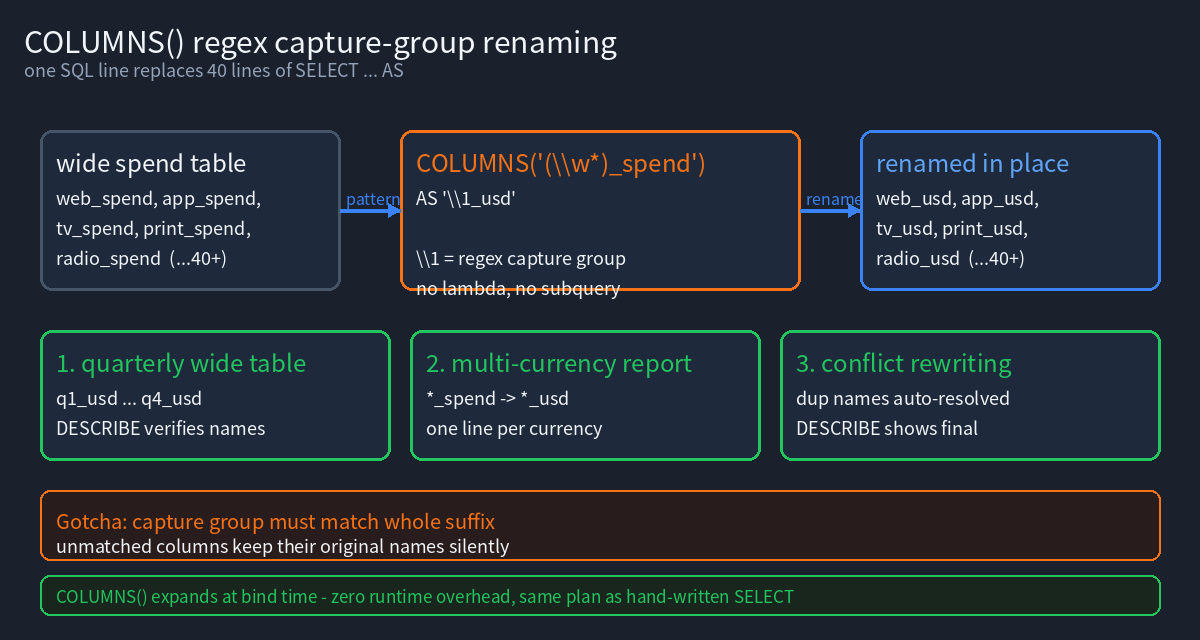
Yes. DuckDB’s COLUMNS() expression supports regex capture-group renaming — one SQL statement that simultaneously selects columns by pattern and renames them by capture group.
Scope of this article: focuses on regex capture-group renaming (
\1,\0,(?i)backreferences). For star modifiers (EXCLUDE / REPLACE / RENAME) and UNPIVOT de-duplication, see the predecessor foundational guide.
1. Minimal runnable example
Let’s get the base syntax running first. Paste this straight into the DuckDB CLI:
SELECT COLUMNS('(\w*)_spend') AS '\1_spend_usd'
FROM (SELECT 10 AS web_spend, 20 AS app_spend, 30 AS store_spend);
Output:
┌───────────────┬───────────────┬─────────────────┐
│ web_spend_usd │ app_spend_usd │ store_spend_usd │
│     int32     │     int32     │      int32      │
├───────────────┼───────────────┼─────────────────┤
│            10 │            20 │              30 │
└───────────────┴───────────────┴─────────────────┘
Three things happen in that statement:
'(\w*)_spend'is a regex, not a LIKE wildcard. When you put a string constant in theCOLUMNS()argument position, DuckDB treats it as a regular expression to match column names.(\w*)is a capture group, capturingweb/app/store.- The
\1inAS '\1_spend_usd'is replaced with the first capture group’s content — so the final column names becomeweb_spend_usdand friends.
The official docs use
SELECT COLUMNS('(\w{3}).*') AS '\1'.\0is the entire match,\1/\2are the first/second capture groups, matching sed / Pythonre.subbackreference semantics.
Why not * REPLACE? Because REPLACE requires you to write expression AS new_name, and the name must be a constant. Batch renaming would mean one line per column. COLUMNS() + capture groups is the only way to “batch rename by rule.”
2. Scenario 1: batch-renaming a quarterly wide table
A common real-world report shape: one row per region/channel, followed by three quarterly columns. We want q1_amount → amount_q1 (swap the prefix and suffix).
CREATE OR REPLACE TABLE sales AS SELECT * FROM (VALUES
  ('north','web',100.00,150.00,120.00,80.00),
  ('north','app',140.00,130.00,110.00,90.00),
  ('south','web',200.00,180.00,240.00,120.00)
) t(region, channel, q1_amount, q2_amount, q3_amount, cost);

SELECT region, channel, COLUMNS('q([0-9])_amount') AS 'amount_q\1'
FROM sales;
Output:
┌─────────┬─────────┬──────────────┬──────────────┬──────────────┐
│ region  │ channel │  amount_q1   │  amount_q2   │  amount_q3   │
│ varchar │ varchar │ decimal(5,2) │ decimal(5,2) │ decimal(5,2) │
├─────────┼─────────┼──────────────┼──────────────┼──────────────┤
│ north   │ web     │       100.00 │       150.00 │       120.00 │
│ north   │ app     │       140.00 │       130.00 │       110.00 │
│ south   │ web     │       200.00 │       180.00 │       240.00 │
└─────────┴─────────┴──────────────┴──────────────┴──────────────┘
The cost column is automatically dropped because the regex only matches q[0-9]_amount. This is the second value of COLUMNS() over SELECT *: selection and renaming happen in one operation — no separate SELECT then EXCLUDE.
DESCRIBE confirms the names really changed (not just the display header):
DESCRIBE (SELECT COLUMNS('q([0-9])_amount') AS 'amount_q\1' FROM sales);
┌───────────────────┐
│       sales       │
│                   │
│ amount_q1 decimal │
│ amount_q2 decimal │
│ amount_q3 decimal │
└───────────────────┘
3. Scenario 2: adding a uniform suffix to multi-currency metrics
A more finance-flavored case: original columns usd_sales, eur_sales, gbp_sales; downstream wants a “currency_metric_unit” three-part name like usd_sales_usd.
SELECT COLUMNS('^(\w{3})_sales$') AS '\1_sales_usd'
FROM (SELECT 1.5 AS usd_sales, 2.0 AS eur_sales, 3.0 AS gbp_sales);
Two regex details deserve their own note:
^and$anchoring: without anchors,\w{3}_saleswould also match theusd_salessubstring insidetotal_usd_sales— but the capture group would grab the wrong offset. With many wide-table columns, anchoring is mandatory insurance.\wincludes underscores and digits, so\w{3}precisely matchesusdbut also matchesa_1. For letters only, use[a-z]{3}.
An often-overlooked point: capture group numbering starts at \1; \0 is the whole match. The shortest way to add a uniform prefix to every column is:
SELECT COLUMNS('.*_amount') AS 'amt_\0' FROM sales;
Column names become amt_q1_amount, amt_q2_amount, amt_q3_amount — \0 keeps the full original match.
4. Scenario 3: mixed-case column selection and normalization
Upstream exports often use camelCase names like Amount and AmountUSD. COLUMNS() regexes are case-sensitive by default; add the inline flag (?i) when you need case-insensitivity:
-- Case-sensitive: a.* only matches lowercase 'apple'
SELECT COLUMNS('a.*') FROM (SELECT 1.5 AS Amount, 2.5 AS apple);
-- Result: one column, apple

-- Case-insensitive: (?i)a.* matches both
SELECT COLUMNS('(?i)a.*') FROM (SELECT 1.5 AS Amount, 2.5 AS apple);
-- Result: two columns, Amount and apple
(?i) is an inline-flag syntax that DuckDB’s regex engine supports — verified that under (?i), a.* matches both uppercase Amount and lowercase apple.
Pitfall, measured: the anchor
\A(PCRE “start of subject”) does not behave per PCRE semantics for column-name matching in this engine —COLUMNS('\A.*')andCOLUMNS('(?i)a.*')returned exactly the same two columns in testing. Don’t use\Ahoping to “anchor to uppercase A only”;(?i)plus explicit case is the reliable approach.
Lambda selection + \0 renaming works (an easily-missed combination): the lambda side handles column selection, the AS side handles renaming — clean separation:
-- Lambda selects (case-insensitively, names starting with 'a'), AS adds prefix/suffix via \0
SELECT COLUMNS(c -> c ILIKE 'a%') AS 'x\0y'
FROM (SELECT 1.5 AS Amount, 2.5 AS apple);
Measured output names: xAmounty, xappley — lambda selection and \0 renaming in one SQL line.
But note: with lambda selection, the AS side cannot use \1 (there’s no capture group to reference):
-- Binder Error: Only the backslash escape code \0 can be used when no regex is supplied to COLUMNS(*)
SELECT COLUMNS(c -> c ILIKE 'a%') AS '\1' FROM (SELECT 1.5 AS Amount, 2.5 AS apple);
You also cannot write a second AS inside the lambda — this is a syntax error, whatever some tutorials claim:
-- Parser Error: syntax error at or near "AS"
SELECT COLUMNS(c -> c ILIKE 'a%' AS lower(c)) FROM ...;
To actually turn Amount into amount (a real case change), neither capture groups nor \0 concatenation can do it — they only “keep the original and add material around it.” The viable paths are: select with lambda → grab the original name via \0 → wrap an explicit alias in the outer query, or just use ALTER TABLE ... RENAME COLUMN per column.
Conclusion: use capture groups '\1_suffix' for structured batch renaming; use (?i) or lambda ILIKE for case-insensitive selection; case normalization can only happen in the outer SQL or DDL — COLUMNS() itself has no transformation power. Keeping these three boundaries straight is what prevents “thought I changed the case, but it silently didn’t” bugs.
5. Scenario 4: batch aggregation with self-documenting names
The most overlooked capability of COLUMNS(): it isn’t limited to renaming in the SELECT list — it also works as an argument to aggregate functions, and capture-group naming still applies.
Here we compute min and max of the three quarterly columns per region, with semantically self-describing result names:
SELECT min(COLUMNS('q([0-9])_amount')) AS 'lo_q\1',
       max(COLUMNS('q([0-9])_amount')) AS 'hi_q\1'
FROM sales;
Output (min and max each expand to 3 quarterly columns, 6 columns total, no duplicate names):
┌──────────────┬──────────────┬──────────────┬──────────────┬──────────────┬──────────────┐
│    lo_q1     │    lo_q2     │    lo_q3     │    hi_q1     │    hi_q2     │    hi_q3     │
│ decimal(5,2) │ decimal(5,2) │ decimal(5,2) │ decimal(5,2) │ decimal(5,2) │ decimal(5,2) │
├──────────────┼──────────────┼──────────────┼──────────────┼──────────────┼──────────────┤
│       100.00 │       130.00 │       110.00 │       200.00 │       180.00 │       240.00 │
└──────────────┴──────────────┴──────────────┴──────────────┴──────────────┴──────────────┘
This is the most useful combination in the article. Without capture groups, AS lo expands into 3 identically-named lo columns — fine for positional reads, useless to the human eye. With \1, names carry the quarter, so a CSV export to downstream won’t misalign.
6. Boundaries: when the capture-group approach doesn’t work
Four hard limits we measured — you must know them before writing:
1. Two different COLUMNS() in the same expression are not allowed.
-- Error: Binder Error: Multiple different STAR/COLUMNS in the same expression are not supported
SELECT COLUMNS('.*_sales') - COLUMNS('.*_cost') FROM metrics;
To compute column-pair differences like “revenue minus cost,” you must UNPIVOT to long format first or explicitly list each pair. This is the most critical current design limitation of COLUMNS().
2. The regex must match at least one column, or it errors immediately.
-- Binder Error: Star expression "COLUMNS(...)" resulted in an empty set of columns
SELECT COLUMNS('typo_prefix_.*') FROM sales;
This differs from the lenient SELECT * behavior. The upside: upstream renames blow up immediately instead of silently dropping columns — the antidote to the “silent data incident” from section 1.
3. Alias collisions.
SELECT COLUMNS('.*_amount') AS 'x' FROM sales produces 3 columns all named x. DuckDB permits this, but downstream df['x'] only gets the first. Either guarantee uniqueness with \0/\1, or UNPIVOT afterward.
4. COLUMNS() cannot be used inside * REPLACE / * RENAME.
-- Error: STAR expression is not supported here
SELECT * REPLACE (COLUMNS('.*_amount') * 1.1 AS q1_amount) FROM sales;
The right side of REPLACE must be a concrete expression, not another star expansion.
7. Zero cost: capture groups don’t affect the plan
Does renaming introduce an extra projection or a performance penalty? On a 2M-row table, SUM(COLUMNS('m[0-9]')) vs hand-written SUM(m1) + SUM(m2) both land in the ~10 ms range (measured 9 ms vs 7 ms locally; the gap is noise). The stricter check is comparing EXPLAIN output: the physical plans are byte-identical (verified with md5sum) — capture groups are resolved in the binder phase, so by the time the optimizer sees them they’re ordinary column references.
In other words: renaming with COLUMNS() + capture groups costs a one-time SQL parse, not a per-row runtime cost. (The predecessor guide Section 5 runs the same zero-overhead check on a 200k × 50-column table — this echoes it.)
8. When to use it / when not to
| Scenario | Recommended | Why |
|---|---|---|
| Batch-rename wide-table columns by pattern (homogeneous) | COLUMNS('regex') AS '\1_suffix' | One line replaces dozens |
| Batch aggregation with readable names | min(COLUMNS('regex')) AS 'lo_\1' | Avoids duplicate names |
| Arithmetic between column pairs | UNPIVOT then JOIN | Multiple COLUMNS() unsupported |
| Few columns (< 5) | Write it out | Regex is less readable |
| Column names need case changes | lambda select + outer alias / DDL | Capture groups only concatenate |
| Column may be missing and must pass silently | SELECT * or lambda | COLUMNS errors on no match |
Keep going
- DuckDB COLUMNS() and Star Modifiers: The Complete Guide — EXCLUDE / REPLACE / RENAME / UNPIVOT fundamentals
- DuckDB UNPIVOT and GROUPING SETS — the right way to go wide-to-long
- The Complete DuckDB Guide — roadmap from install to advanced
- DuckDB List Functions: The Complete Guide — pairing with capture groups for nested structures
Reproducible verification
- Version: DuckDB 1.5.2 (Variegata), Linux x86_64, executed directly in the CLI.
- Note:
\1backreferences require real single backslashes in the file. Passing SQL viaduckdb -c "...\1..."lets the shell swallow the backslashes — write the SQL into a.sqlfile and runduckdb < file.sql. Every example in this article was verified that way. - Official references: Star Expression (including COLUMNS regex and capture groups), Lambda Functions, GROUP BY ALL.
- Article info: last verified 2026-11-12. Found an issue? File a GitHub Issue.