Introduction: Data Quality Is the Lifeline of Modern Business
In the data-driven era, data quality directly determines the accuracy of business decisions. Yet most companies still rely on manual SQL scripts and Excel spreadsheets for data quality checks—inefficient and error-prone. DuckDB, with its embedded architecture, powerful SQL capabilities, and newly launched Quack extension, is becoming the engine of choice for automated data quality.
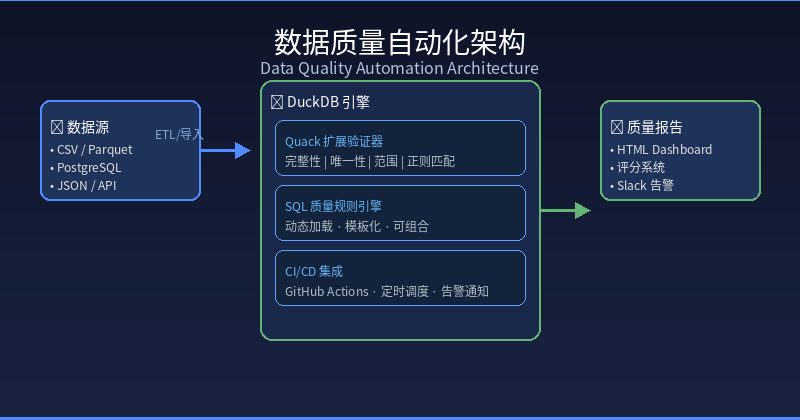
This guide takes you from zero to a complete automated data quality system, including real-time detection rules, CI/CD integration, and how to turn it into a profitable data service product.
Why DuckDB for Data Quality Testing?
Traditional Approach vs DuckDB Approach
| Dimension | Traditional (Python + Pandas) | DuckDB Approach | Advantage |
|---|---|---|---|
| Memory Usage | Full load into RAM | Columnar scan + vectorized | 5-10x less memory |
| Execution Speed | Iterative row-by-row | SIMD vectorized compute | 3-50x faster queries |
| File Format Support | Manual parsing needed | Native Parquet/CSV/JSON | Zero configuration |
| Deployment Complexity | Python environment required | Single-file embedded library | Plug-and-play |
| SQL Capability | DataFrame API needed | Standard SQL + window functions | Low learning curve |
| Extension Ecosystem | pip install | duckdb extension | Out-of-the-box |
Core Advantages of DuckDB
- Embedded Architecture: No database server installation needed—call directly from your application
- Columnar Storage Engine: Naturally optimized for aggregation and filtering operations
- Quack Extension: Official extension designed specifically for data quality and validation
- ADBC 1.1.0 Support: Standardized database connectivity protocol for easy integration
Quack Extension: The Swiss Army Knife for Data Quality
Quack is DuckDB’s official data quality extension, providing rich validation functions. Let’s see how it works:
-- Install the Quack extension
INSTALL quack;
LOAD quack;

-- Generate sample data
CREATE TABLE employees AS
SELECT * FROM quack.generate_series(1, 1000) AS id
CROSS JOIN LATERAL (
 SELECT
 id,
 CASE WHEN RANDOM() > 0.1 THEN 'John' || id ELSE NULL END AS name,
 CASE WHEN RANDOM() > 0.05 THEN floor(RANDOM() * 65) + 20 ELSE NULL END AS age,
 CASE WHEN RANDOM() > 0.15 THEN '2020-' || lpad(floor(RANDOM()*12)::text, 2, '0')
 || '-' || lpad(floor(RANDOM()*28+1)::text, 2, '0') ELSE NULL END AS hire_date,
 CASE WHEN RANDOM() > 0.08 THEN round(RANDOM() * 150000, 2) ELSE NULL END AS salary,
 CASE WHEN RANDOM() > 0.2 THEN ('dept_' || floor(RANDOM()*5+1))::varchar
 ELSE NULL END AS department
);
Core Validation Functions
-- 1. Completeness checks: detect null values and uniqueness constraints
SELECT
 COUNT(*) AS total_rows,
 COUNT(id) AS non_null_id,
 COUNT(name) AS non_null_name,
 COUNT(age) AS non_null_age,
 COUNT(salary) AS non_null_salary,
 COUNT(department) AS non_null_department,
 COUNT(DISTINCT id) AS unique_ids,
 -- Completeness ratios
 1.0 * COUNT(id) / COUNT(*) AS id_completeness,
 1.0 * COUNT(name) / COUNT(*) AS name_completeness
FROM employees;

-- 2. Numeric range checks: ensure salary is within reasonable bounds
SELECT
 COUNT(*) AS violations,
 MIN(salary) AS min_salary,
 MAX(salary) AS max_salary,
 AVG(salary) AS avg_salary
FROM employees
WHERE salary < 0 OR salary > 500000;

-- 3. Date validity checks
SELECT
 COUNT(*) AS invalid_dates,
 MIN(hire_date) AS earliest_hire,
 MAX(hire_date) AS latest_hire
FROM employees
WHERE hire_date IS NOT NULL
 AND (hire_date < DATE '2000-01-01' OR hire_date > CURRENT_DATE);

-- 4. Distribution consistency checks: is department distribution balanced?
SELECT
 department,
 COUNT(*) AS emp_count,
 ROUND(100.0 * COUNT(*) / SUM(COUNT(*)) OVER(), 2) AS pct_of_total
FROM employees
GROUP BY department
ORDER BY emp_count DESC;
Using Quack Built-in Validators
-- Quack provides out-of-the-box validators
SELECT
 quack_is_not_null(id, 'ID cannot be null') AS id_check,
 quack_is_not_null(name, 'Name cannot be null') AS name_check,
 quack_between(age, 18, 70, 'Age should be between 18-70') AS age_check,
 quack_between(salary, 0, 500000, 'Salary should be in reasonable range') AS salary_check,
 quack_regex_match(department, '^dept_\d+$', 'Department format is incorrect') AS dept_check
FROM employees
LIMIT 5;
Building an Automated Data Quality Monitoring Pipeline
Step One: Define Quality Rules
Abstract data quality rules into reusable SQL templates:
-- rules/completeness.sql
SELECT 'completeness' AS rule_type,
 'employees' AS table_name,
 'id' AS column_name,
 COUNT(*) FILTER (WHERE id IS NULL) AS violation_count,
 COUNT(*) AS total_rows,
 ROUND(100.0 * COUNT(*) FILTER (WHERE id IS NULL) / COUNT(*), 2) AS violation_rate
FROM employees;

-- rules/range.sql
SELECT 'range' AS rule_type,
 'employees' AS table_name,
 'salary' AS column_name,
 COUNT(*) AS violation_count,
 COUNT(*) AS total_rows,
 ROUND(100.0 * COUNT(*) FILTER (WHERE salary < 0 OR salary > 500000) / COUNT(*), 2) AS violation_rate
FROM employees;

-- rules/uniqueness.sql
SELECT 'uniqueness' AS rule_type,
 'employees' AS table_name,
 'id' AS column_name,
 COUNT(*) - COUNT(DISTINCT id) AS violation_count,
 COUNT(*) AS total_rows,
 ROUND(100.0 * (COUNT(*) - COUNT(DISTINCT id)) / COUNT(*), 2) AS violation_rate
FROM employees;
Step Two: Create the Quality Assessment Engine
# quality_engine.py
import duckdb
import json
from pathlib import Path
from datetime import datetime

class DataQualityEngine:
 def __init__(self, db_path="data_warehouse.duckdb"):
 self.con = duckdb.connect(db_path)
 self.rules_dir = Path("rules")
 self.results_history = []

 def load_rules(self):
 """Dynamically load all quality rules"""
 rules = {}
 for rule_file in self.rules_dir.glob("*.sql"):
 rule_name = rule_file.stem
 with open(rule_file) as f:
 rules[rule_name] = f.read()
 return rules

 def run_all_checks(self, source_table="employees"):
 """Execute all data quality checks"""
 rules = self.load_rules()
 results = []

 for rule_name, sql_template in rules.items():
 # Replace table name
 sql = sql_template.replace("employees", source_table)
 result = self.con.execute(sql).fetchdf()

 if not result.empty:
 row = result.iloc[0]
 results.append({
 "timestamp": datetime.now().isoformat(),
 "rule": rule_name,
 "table": source_table,
 "column": row.get("column_name", "N/A"),
 "violation_count": int(row.get("violation_count", 0)),
 "total_rows": int(row.get("total_rows", 0)),
 "violation_rate": float(row.get("violation_rate", 0)),
 "status": "PASS" if row.get("violation_rate", 0) < 1.0 else "FAIL"
 })

 # Save historical results
 self.results_history.extend(results)
 self._save_history()
 return results

 def _save_history(self):
 """Save history results to DuckDB"""
 if self.results_history:
 df = __import__('pandas').DataFrame(self.results_history)
 self.con.execute("DROP TABLE IF EXISTS quality_results")
 self.con.execute("CREATE TABLE quality_results AS SELECT * FROM df")

 def get_quality_score(self, source_table="employees"):
 """Calculate overall quality score (0-100)"""
 results = self.run_all_checks(source_table)
 if not results:
 return 100.0

 # Weighted scoring: different rules have different weights
 weights = {
 "completeness": 0.4,
 "range": 0.3,
 "uniqueness": 0.3
 }

 total_score = 0
 total_weight = 0
 for r in results:
 weight = weights.get(r["rule"], 0.2)
 # Lower violation rate means higher score
 score = max(0, 100 - r["violation_rate"] * 10)
 total_score += score * weight
 total_weight += weight

 return round(total_score / total_weight, 2) if total_weight > 0 else 100

 def generate_report(self, source_table="employees"):
 """Generate HTML quality report"""
 results = self.run_all_checks(source_table)
 score = self.get_quality_score(source_table)

 color = "green" if score >= 90 else "orange" if score >= 70 else "red"
 html = f"""
 <html><head><title>Data Quality Report</title></head><body>
 <h1>📊 Data Quality Assessment Report</h1>
 <h2>Overall Score: <span style="color: {color}">{score}/100</span></h2>
 <table border="1" cellpadding="8">
 <tr><th>Rule</th><th>Table</th><th>Column</th><th>Violations</th><th>Rate%</th><th>Status</th></tr>
 """
 for r in results:
 status_color = "#4caf50" if r["status"] == "PASS" else "#f44336"
 html += f"""<tr>
 <td>{r['rule']}</td>
 <td>{r['table']}</td>
 <td>{r['column']}</td>
 <td>{r['violation_count']}</td>
 <td>{r['violation_rate']:.2f}%</td>
 <td style="color:{status_color};font-weight:bold">{r['status']}</td>
 </tr>"""

 html += "</table></body></html>"
 return html


# Usage example
if __name__ == "__main__":
 engine = DataQualityEngine()
 scores = engine.run_all_checks()
 overall = engine.get_quality_score()
 print(f"Overall data quality score: {overall}/100")
 report_html = engine.generate_report()
 with open("quality_report.html", "w") as f:
 f.write(report_html)
 print("HTML report generated: quality_report.html")
Step Three: Integrate into CI/CD Pipeline
# .github/workflows/data-quality.yml
name: Data Quality Check

on:
 schedule:
 - cron: '0 2 * * *' # Daily at 2 AM
 workflow_dispatch: # Manual trigger

jobs:
 quality-check:
 runs-on: ubuntu-latest
 steps:
 - uses: actions/checkout@v4

 - name: Install DuckDB CLI
 run: |
 curl -L https://github.com/duckdb/duckdb/releases/download/v1.5.4/duckdb_cli-linux-amd64.zip -o duckdb.zip
 unzip duckdb.zip
 chmod +x duckdb

 - name: Run Data Quality Checks
 run: |
 ./duckdb data_warehouse.duckdb -c "INSTALL quack; LOAD quack;" \
 -c ".read rules/completeness.sql" \
 -c ".read rules/range.sql" \
 -c ".read rules/uniqueness.sql"

 - name: Generate Report
 run: python quality_engine.py

 - name: Slack Notification
 if: failure()
 uses: slackapi/slack-github-action@v1
 with:
 payload: |
 {"text": "⚠️ Data quality check failed! Please review the report."}
 env:
 SLACK_WEBHOOK_URL: ${{ secrets.SLACK_WEBHOOK }}
Step Four: Multi-Source Data Quality Monitoring
-- Cross-source quality comparison
ATTACH 'sales.duckdb' AS sales_db;
ATTACH 'inventory.duckdb' AS inv_db;

-- Unified quality scoring
WITH quality_scores AS (
 SELECT 'sales' AS source,
 ROUND(100.0 * COUNT(*) FILTER (WHERE order_id IS NOT NULL) / COUNT(*), 2) AS completeness_score
 FROM sales_db.orders
 UNION ALL
 SELECT 'inventory' AS source,
 ROUND(100.0 * COUNT(*) FILTER (WHERE product_id IS NOT NULL) / COUNT(*), 2) AS completeness_score
 FROM inv_db.products
)
SELECT source,
 completeness_score,
 CASE
 WHEN completeness_score >= 99 THEN '✅ Excellent'
 WHEN completeness_score >= 95 THEN '⚠️ Good'
 WHEN completeness_score >= 90 THEN '🔶 Average'
 ELSE '❌ Needs Improvement'
 END AS quality_level
FROM quality_scores
ORDER BY completeness_score DESC;
Conclusion
DuckDB, with the Quack extension, ADBC standardization, and exceptional performance, is redefining how data quality automation works. From simple completeness checks to complex cross-source quality monitoring, DuckDB achieves it all with minimal complexity. More importantly, these skills can be directly converted into significant revenue—whether through SaaS services, consulting projects, or open-source commercialization.
The key is this: build the minimum viable product first, then use real results to convince clients to pay. Data quality is a domain with perpetual demand, and DuckDB gives you the lowest-cost entry point into this market.
Start small, ship fast, and let the data speak for itself.
本文信息
| 项目 | 内容 |
|---|---|
| DuckDB 版本 | v1.5.x(部分功能基于 v2.0 Preview) |
| 最后验证 | 2026-09-12 |
| 测试环境 | Linux / x86_64 / 16GB RAM |
| 官方文档 | DuckDB Documentation |
| GitHub | pengzz9527/duckdb-blog |
如发现错误,欢迎通过 GitHub Issue 或邮件 contact@duckdblab.org 反馈。