Introduction: “Just Sample It” Is Only Half True
“Just sample the table” is the standard advice for exploring a large dataset fast. It sounds free: read 10% of the rows, get an answer 10 times quicker. In DuckDB that intuition is only half true, and the half that is false is where most people get burned.
DuckDB supports two sampling syntaxes — its native USING SAMPLE and the SQL-standard TABLESAMPLE — with three sampling methods behind them (SYSTEM, BERNOULLI, RESERVOIR). They behave very differently, they have different defaults, and one of them silently reads the entire table no matter what percentage you ask for.
Every number below was produced on DuckDB 1.5.4, and the surprising ones — including a case where sampling made a query 16× slower — are reproducible.
Two Syntaxes, One Confusing Overlap
DuckDB accepts both of these:
-- DuckDB-native
SELECT * FROM events USING SAMPLE 10%;

-- SQL-standard
SELECT * FROM events TABLESAMPLE 10 PERCENT;
They look interchangeable. They are not. USING SAMPLE understands both a percentage and a row count; TABLESAMPLE treats a bare number as a percentage and a parenthesised number as something else entirely — which is the source of the first trap.
Let’s build a table to work with:
CREATE TABLE events AS
SELECT i AS id,
       (i % 7) AS category,
       random() * 100 AS value
FROM range(100000) t(i);
SELECT count(*) FROM events;
┌──────────────┐
│ count_star() │
│    int64     │
├──────────────┤
│       100000 │
└──────────────┘
Three Sampling Methods and Their Hidden Defaults
Behind both syntaxes sit three algorithms. Choosing one changes both the result and the cost:
| Method | What it does | Granularity | Reads all data? |
|---|---|---|---|
RESERVOIR | Uniform sample of an exact size, reservoir maintained while scanning | row | yes |
BERNOULLI | Independent coin flip per row | row | yes |
SYSTEM | Whole blocks / row groups chosen at random | block | no (can be pushed down) |
The default method is not the same for both forms, and this catches people out:
-- percentage form: default is SYSTEM
EXPLAIN SELECT count(*) FROM events USING SAMPLE 10% (system);

-- row-count form: default is RESERVOIR
SELECT count(*) FROM events USING SAMPLE 5000 ROWS;
Measured on 100,000 rows, the three methods return visibly different-sized samples for the same “10%” request:
USING SAMPLE 10% (system)     ->  8192 rows
USING SAMPLE 10% (bernoulli)  -> 10017 rows
USING SAMPLE 10% (reservoir)  -> 10000 rows
RESERVOIR is exact. BERNOULLI is statistically exact but noisy. SYSTEM is block-quantised, so it can be several percent off from the nominal rate — that is not a bug, it is the price of being able to skip I/O.
Five Syntax Traps, with the Exact Errors
Trap 1: USING SAMPLE Must Be the Last Thing in FROM
You cannot chain a WHERE or GROUP BY directly after it:
SELECT category, count(*)
FROM events USING SAMPLE 20%
GROUP BY category;
Parser Error: syntax error at or near "GROUP"
Wrap the sample in a subquery instead:
SELECT category, count(*)
FROM (SELECT * FROM events USING SAMPLE 20% (bernoulli)) s
GROUP BY category
ORDER BY category;
Trap 2: TABLESAMPLE SYSTEM (n) Is Illegal
The parenthesised form expects a percentage, so a small integer is read as a row count and rejected:
SELECT count(*) FROM events TABLESAMPLE SYSTEM (5);
Error: Sample method System cannot be used with a discrete sample count,
either switch to reservoir sampling or use a percentage.
Use TABLESAMPLE SYSTEM (5%) or a bare TABLESAMPLE 5 PERCENT instead. The same rule applies to BERNOULLI.
Trap 3: TABLESAMPLE RESERVOIR (5) Means 5 Rows
SELECT count(*) FROM events TABLESAMPLE RESERVOIR (5);
┌──────────────┐
│       5      │
└──────────────┘
Five. Not five percent. RESERVOIR is the one method that takes a discrete row count in the parenthesised form.
Trap 4: SYSTEM Can Return Zero Rows
Because SYSTEM samples whole row groups, a table that fits in a single row group has nothing to subdivide. Ask for 5% and you can get nothing:
CREATE TABLE small AS SELECT i FROM range(1000) t(i);
SELECT count(*) FROM small USING SAMPLE 5% (system);
┌──────────────┐
│       0      │
└──────────────┘
If you need a guaranteed sample of a small table, use RESERVOIR.
Trap 5: SYSTEM and TABLESAMPLE SYSTEM Differ Under the Hood
The USING SAMPLE … (system) form pushes the sample into the scan. The TABLESAMPLE SYSTEM (x%) form can surface as a separate operator (see the next section), which matters for cost.
What EXPLAIN Reveals: Pushdown vs Post-Filter
This is the part that explains every benchmark result later. Compare the plans:
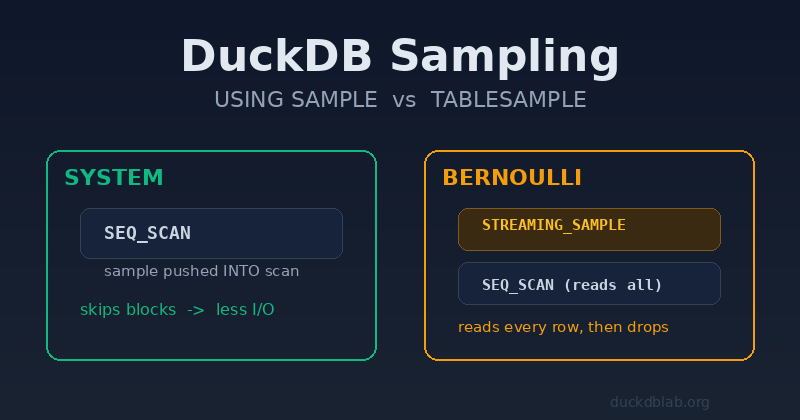
EXPLAIN SELECT count(*) FROM events USING SAMPLE 10% (system);
┌───────────────────────────┐
│    UNGROUPED_AGGREGATE    │
└─────────────┬─────────────┘
┌─────────────┴─────────────┐
│          SEQ_SCAN         │
│       Table: events       │
│       Sample Method:      │
│       System: 10.0%       │   <-- sampling lives INSIDE the scan
└───────────────────────────┘
EXPLAIN SELECT count(*) FROM events USING SAMPLE 10% (bernoulli);
┌───────────────────────────┐
│    UNGROUPED_AGGREGATE    │
└─────────────┬─────────────┘
┌─────────────┴─────────────┐
│      STREAMING_SAMPLE     │   <-- an EXTRA operator above the scan
│   Bernoulli: 10.000000%   │
└─────────────┬─────────────┘
┌─────────────┴─────────────┐
│          SEQ_SCAN         │
│     Type: Sequential Scan │   <-- reads EVERY row
└───────────────────────────┘
Two different worlds:
SYSTEMpushes the sample into the scan. The scan knows to skip blocks, so it can avoid I/O.BERNOULLI(andRESERVOIR) add an operator on top of the scan. The scan still touches every row; the operator then throws rows away. You pay for all the I/O and all the row materialisation, then discard most of it.
That single fact explains why BERNOULLI is frequently slower than not sampling at all.
Making Samples Reproducible
Random samples are random runs. To pin one down — essential for experiments you want to re-run or explain — pass a seed.
SELECT count(*) FROM events USING SAMPLE 5% (reservoir, 7);
┌──────────────┐
│    5000      │
└──────────────┘
Run it twice with the same seed and you get the identical 5000 rows; change the seed and you get a different 5000. This is the only way to make a “sampled” result a stable artefact you can cite.
Benchmarks: When Sampling Actually Wins
All timings are best-of-3, DuckDB 1.5.4, 4 threads, local SSD, Parquet with ZSTD.
A Cheap Predicate on 5M Rows
Data: 5,000,000 rows, ~45 MB Parquet. Query: count(*) WHERE value > 900.
| Plan | Time | vs full scan |
|---|---|---|
| full scan | 62.9 ms | 1.00× |
USING SAMPLE 10% (system) | 55.4 ms | 1.14× faster |
USING SAMPLE 10% (bernoulli) | 160.9 ms | 0.39× (2.6× slower) |
USING SAMPLE 500000 ROWS (reservoir) | 1008.9 ms | 0.06× (16× slower) |
Sampling barely helped — and two of the three methods were dramatically worse. RESERVOIR had to scan everything and maintain a 500,000-row reservoir to boot.
An Expensive Per-Row Predicate
Same data, but the filter now runs a regex per row (regexp_matches on an email column):
| Plan | Time | vs full scan |
|---|---|---|
| full scan | 1086.0 ms | 1.00× |
USING SAMPLE 10% (system) | 624.5 ms | 1.7× faster |
USING SAMPLE 1% (system) | 390.3 ms | 2.8× faster |
USING SAMPLE 10% (bernoulli) | 1170.7 ms | 0.93× (slower) |
Now the picture inverts. When each row is expensive to process, dropping rows before the expensive work pays off — and SYSTEM gets the credit because it prunes the scan instead of post-filtering.
The rule of thumb this produces: sampling helps in proportion to how expensive the rest of the query is. If the query is a cheap aggregate over warm local data, a full scan is already fast and sampling adds overhead.
How Accurate Is a Sample?
Sampling is only useful if you can trust the estimate. For a predicate matching ~499,441 of 5,000,000 rows (~10%), here is the error of the scaled estimate:
| Method | Sample size | Estimated total | Error |
|---|---|---|---|
SYSTEM | 1% | 565,400 | 13.21% |
SYSTEM | 5% | 511,460 | 2.41% |
SYSTEM | 10% | 479,750 | 3.94% |
SYSTEM | 25% | 511,548 | 2.42% |
BERNOULLI | 1% | 516,800 | 3.48% |
BERNOULLI | 10% | 499,280 | 0.03% |
Two takeaways:
- 1% is too coarse for anything you will quote; error was 13% for
SYSTEM. - Sampling error is not monotonic.
SYSTEMat 10% was worse than at 5% here — block quantisation means a “bigger” percentage is not guaranteed to be closer.BERNOULLIis the more predictable estimator when you need a number rather than a vibe.
Sampling vs Approximate Aggregates
Which is better — sampling, or an approx_* aggregate? On 5M rows:
| Approach | Time | Result | Error |
|---|---|---|---|
count(DISTINCT id) (exact) | 312.6 ms | 5,000,000 | — |
approx_count_distinct(id) | 139.6 ms | 4,889,466 | 2.21% |
USING SAMPLE 5% (system), scaled | 81.2 ms | 4,751,360 | 4.97% |
Here sampling was actually faster than the approximate aggregate — but with roughly twice the error. Neither wins universally:
approx_*aggregates run in a single pass, replace the exact operator in-place, and give error bounds you can reason about. Prefer them for distinct counts, quantiles and top-k.- Sampling is the right tool when you want an actual subset of rows to run arbitrary further queries against — a fixture, or a reproducible exploration sample.
For quantiles the gap narrows: quantile_cont ran in 428.6 ms versus 308.1 ms for approx_quantile on the same data — a 1.4× win, versus 2.2× for the distinct count.
When to Sample, and When Not To
Sample when:
- The data is remote (S3/HTTP) or cold, so skipping I/O is the whole point.
- You are exploring an unfamiliar table and want a shape, not a number.
- The query has heavy per-row work (regex, JSON parsing, string surgery) after the filter.
- You need a reproducible experiment — with a fixed seed.
Do not sample when:
- The full scan is already fast (warm local Parquet, cheap aggregates). You will often lose.
- You need an exact answer. Sampling cannot give you one.
- You reach for
RESERVOIRwith a large row count — it is the most expensive method. - You need a guaranteed non-empty sample of a tiny table (
SYSTEMmay return zero rows).
Practical Recipes
Reproducible 5% sample for a report:
SELECT category, avg(value)
FROM (SELECT * FROM read_parquet('events.parquet')
      USING SAMPLE 5% (system, 42)) s
GROUP BY category;
Exact-N sample for a unit test fixture:
COPY (SELECT * FROM big_table USING SAMPLE 1000 ROWS (reservoir, 1))
TO 'fixture.parquet' (FORMAT PARQUET);
Estimate a skew quickly, then verify:
-- quick look
SELECT category, count(*) FROM (SELECT * FROM events USING SAMPLE 5% (bernoulli, 7)) GROUP BY category ORDER BY 2 DESC;
-- confirmed answer (no sample) when the number matters
SELECT category, count(*) FROM events GROUP BY category ORDER BY 2 DESC;
Summary
DuckDB gives you two syntaxes (USING SAMPLE, TABLESAMPLE) and three methods (SYSTEM, BERNOULLI, RESERVOIR) with different defaults and different costs. Only SYSTEM can be pushed into the scan; BERNOULLI and RESERVOIR read every row first, which is why they are routinely slower than a full scan. Sampling is not a universal speed-up — it won on expensive per-row predicates (up to 2.8×) and lost badly on cheap ones (down to 0.06×).
Next steps:
- Run
EXPLAINon any sampled query and check whether the sample sits inside the scan or in aSTREAMING_SAMPLEabove it. - Prefer
approx_*aggregates when you only need an approximate number; reach for sampling when you want a re-runnable subset of rows. - Always seed a sample you intend to quote.
Measure before you sample. The one-line change USING SAMPLE 10% can make a query three times faster or sixteen times slower — and EXPLAIN tells you which before you run it.