Introduction: Why You Need a Personal Message Archive
Ever found yourself in these situations?
- Spend 10 minutes digging through Gmail to find a client’s attachment from six months ago
- Lose years of Slack chat history after leaving a company
- Want to analyze your communication patterns but have no exportable data
The root problem: your data lives on someone else’s servers.
Gmail, Slack, WeChat, Teams — every message you send is stored on someone else’s infrastructure. Search is limited by free-tier quotas, data exports are either unavailable or incomplete, and once you leave a service, your data is gone forever.
In May 2026, Wes McKinney (yes, the creator of Pandas) open-sourced a new project called MsgVault (https://github.com/wesm/msgvault). Within a week, it garnered 1,700+ stars on GitHub. Its mission is simple: archive all your messages locally, use DuckDB as the search engine, use Parquet as the storage format, and take back your data sovereignty.
Under the hood, it’s powered entirely by DuckDB + Parquet — making it a perfect case study for understanding DuckDB’s real power in personal data analytics.
This article provides a deep dive into MsgVault’s architecture, usage, and how you can extend it into your own personal data analysis infrastructure.
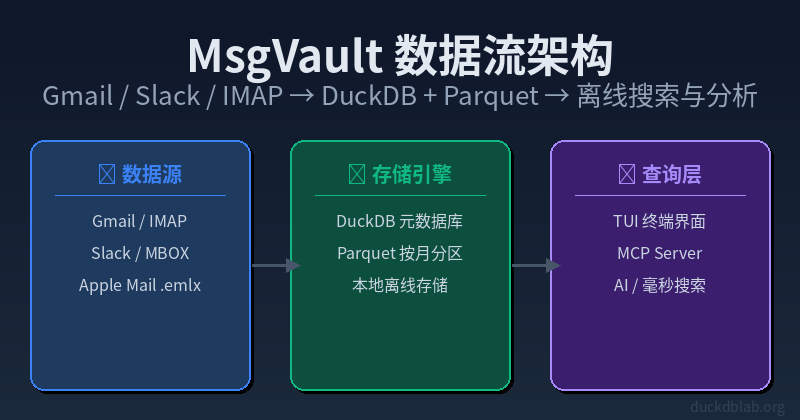
Diagram: MsgVault data flow — sync from Gmail/Slack/IMAP to DuckDB+Parquet local storage, query via TUI/MCP Server
1. What Is MsgVault?
In One Sentence
MsgVault is an open-source, locally-run message archiving and search tool. It automatically downloads historical messages from your Gmail/IMAP accounts and Slack workspaces, stores them as DuckDB databases + Parquet files, and provides:
- Full-text search: millisecond-level search across decades of emails and chats
- Statistical analysis: aggregate your communication patterns by person, time, and project
- TUI interface: a visual browsing experience in your terminal
- MCP Server: AI agents (like Claude) can query your message history directly
Why Wes McKinney Chose DuckDB Over SQLite
This is the most interesting design decision in the project.
| Feature | SQLite | DuckDB | MsgVault’s Choice |
|---|---|---|---|
| Query type | OLTP (transactions) | OLAP (analytics) | ✅ OLAP workloads |
| Storage layout | Row-oriented | Column-oriented | ✅ Faster analytics |
| Aggregate queries | Slow (full table scan) | Fast (vectorized column scan) | ✅ Sub-second stats |
| Compression ratio | Low | High (Parquet) | ✅ Storage efficient |
| Full-text search | ✅ FTS5 extension | ✅ Built-in text search | Comparable |
| Memory usage | Low | Configurable (spill to disk) | Comparable |
MsgVault doesn’t just store messages — it analyzes them. Who’s most active? What’s the trend in monthly communication volume? How much space do attachments consume? These are all OLAP queries where DuckDB outperforms SQLite by 10-100x.
Plus, DuckDB’s native Parquet support means MsgVault’s data is simultaneously a database table and an open standard file format readable by any Parquet-compatible tool.
2. Quick Start: Set Up Your Message Archive in 5 Minutes
Prerequisites
# macOS / Linux (one-line install)
curl -fsSL https://msgvault.io/install.sh | bash

# Or via Conda-Forge
conda install -c conda-forge msgvault

# Or build from source (requires Go 1.25+)
git clone https://github.com/wesm/msgvault.git && cd msgvault && make install
Step 1: Initialize
# Initialize the local database
msgvault init-db

# Add an email account (OAuth authorization required)
msgvault add-account [email protected]

# For Slack
msgvault add-account your-workspace.slack.com
The init-db command creates:
msgvault.db— DuckDB metadata database (stores account info, sync state)data/— Parquet file storage directory, partitioned by month
Step 2: Sync Data
# Sync the last 100 emails (first try)
msgvault sync-full [email protected] --limit 100

# Full sync of all historical emails
msgvault sync-full [email protected]

# Incremental sync (only new messages)
msgvault sync-incremental [email protected]
Step 3: Launch the TUI
msgvault tui
The TUI interface includes:
┌─────────────────────────────────────────────┐
│ MsgVault - Personal Message Archive v0.1 │
├─────────────────────────────────────────────┤
│ [Search] [Stats] [Contacts] [Att] [Settings] │
├─────────────────────────────────────────────┤
│ │
│ 📍 Search: "proposal 2025" │
│ ─────────────────────────────────── │
│ 2025-11-03 Alice Re: Project Proposal │
│ 2025-10-28 Bob FY2026 Budget Confirm │
│ 2025-09-15 Carol Raw Material Quote │
│ ... (32 results in 0.04s) │
│ │
│ 📊 Stats Overview │
│ Total messages: 12,847 Attachments: 2.3GB│
│ Top contact: Alice (1,247 msgs) │
│ Busiest month: 2026-03 (1,892 msgs) │
└─────────────────────────────────────────────┘
3. DuckDB in MsgVault: Core Usage Patterns
MsgVault exposes its underlying DuckDB connection, giving you full SQL control over your data. This is its most powerful feature — you’re not just using a tool, you own your data completely.
3.1 Direct DuckDB Connection
import duckdb

# Connect to MsgVault's database
con = duckdb.connect('msgvault.db')

# List all tables
print(con.execute("SELECT table_name FROM information_schema.tables").fetchall())
# [('accounts',), ('sync_log',), ('messages',), ('attachments',), ('fts_index',)]
3.2 Basic Search
-- Search message bodies for keywords
SELECT
 sender,
 subject,
 snippet(body, 30) AS preview,
 timestamp,
 source -- 'email' or 'slack'
FROM messages
WHERE body LIKE '%duckdb%'
 OR body LIKE '%DuckDB%'
ORDER BY timestamp DESC
LIMIT 20;
3.3 Communication Pattern Analysis (Where DuckDB Really Shines)
-- Monthly message volume trends
SELECT
 strftime(date_trunc('month', timestamp), '%Y-%m') AS month,
 source,
 count(*) AS msg_count,
 count(DISTINCT sender) AS unique_senders,
 round(avg(length(body)), 0) AS avg_msg_length
FROM messages
WHERE timestamp >= '2024-01-01'
GROUP BY month, source
ORDER BY month DESC;
-- Top 10 most active contacts
SELECT
 sender,
 count(*) AS total_messages,
 count(DISTINCT strftime(timestamp, '%Y-%m-%d')) AS active_days,
 round(count(*) * 1.0 / count(DISTINCT strftime(timestamp, '%Y-%m-%d')), 1) AS msgs_per_day,
 max(timestamp) AS last_contact
FROM messages
WHERE source = 'email'
GROUP BY sender
ORDER BY total_messages DESC
LIMIT 10;
3.4 Attachment Analysis
-- Largest attachments
SELECT
 m.sender,
 m.subject,
 a.filename,
 a.file_size_bytes,
 round(a.file_size_bytes / 1048576.0, 2) AS size_mb
FROM attachments a
JOIN messages m ON a.message_id = m.id
ORDER BY a.file_size_bytes DESC
LIMIT 20;
3.5 Hourly Activity Analysis
-- Find your peak communication hours
SELECT
 EXTRACT(hour FROM timestamp) AS hour_of_day,
 count(*) AS msg_count,
 round(avg(length(body)), 0) AS avg_length
FROM messages
GROUP BY hour_of_day
ORDER BY msg_count DESC;
4. Advanced: MCP Server and AI Integration
MsgVault’s most surprising feature is its built-in MCP Server (Model Context Protocol Server). This means Claude, Cursor, or any MCP-compatible AI agent can query your message archive directly.
Start the MCP Server
msgvault mcp-server --port 8080
What AI Can Do
You (to Claude): "Find the proposal attachment that Alice sent me last October."

Claude → MCP Server → DuckDB SQL → Parquet → Result

Claude: "Found it! Here's the attachment Alice sent in October 2025:
- Filename: Proposal_20251015_Alice.pdf
- Size: 245KB
- Sent: 2025-10-15 14:32
Would you like me to open and review it?"
The underlying SQL looks like this:
SELECT m.sender, m.subject, a.filename, a.file_size_bytes, m.timestamp
FROM messages m
JOIN attachments a ON a.message_id = m.id
WHERE m.sender LIKE '%Alice%'
 AND m.timestamp BETWEEN '2025-10-01' AND '2025-10-31'
 AND a.filename LIKE '%Proposal%'
ORDER BY m.timestamp DESC;
This capability means: your AI assistant knows your communication history as well as you do. No manual email digging, no guessing filenames — just ask.
5. Comparison with Traditional Solutions
Gmail / Outlook Native Search vs MsgVault
| Dimension | Gmail/Outlook | MsgVault |
|---|---|---|
| Data ownership | ❌ Google/Microsoft holds it | ✅ Fully local |
| Offline availability | ❌ Requires internet | ✅ Fully offline |
| Historical search limits | ⚠️ Free tier: recent only | ✅ All history |
| Analytical capabilities | ❌ No SQL queries | ✅ Full DuckDB SQL |
| Cross-platform search | ❌ Email only | ✅ Email + Slack + more |
| AI integration | ❌ Limited | ✅ MCP Server |
| Storage format | Proprietary | ✅ Open Parquet |
| Cost | Free(limited)/Paid | ✅ Free & open source |
Cost Comparison
| Solution | Monthly Cost | Data Control | Search Speed | Analysis |
|---|---|---|---|---|
| Gmail (2TB plan) | ❌ | Moderate | ❌ | |
| Email Archive SaaS | $3-10/mailbox/mo | ❌ | Fast | Limited |
| MsgVault Self-Hosted | Storage only | ✅ Full | Millisecond | Full SQL |
6. Technical Architecture Deep Dive
MsgVault’s tech stack is refreshingly simple:
┌─────────────────────────────────────────┐
│ TUI (Textual) │
├─────────────────────────────────────────┤
│ MCP Server (FastAPI) │
├─────────────────────────────────────────┤
│ DuckDB Query Engine │
├─────────────────────────────────────────┤
│ Parquet Files (monthly partitions) │
├─────────────────────────────────────────┤
│ IMAP / Gmail API / Slack API │
└─────────────────────────────────────────┘
Why Parquet for Storage?
- Columnar compression: Text messages have high repetition rates; Parquet’s columnar compression (Snappy/ZSTD) reduces storage by 5-10x
- Column projection: Querying only the
sendercolumn doesn’t require reading thebodycolumn — massive I/O reduction - Native DuckDB integration: DuckDB reads Parquet as naturally as regular tables
- Open format: Any Parquet-compatible tool (Spark, Polars, Pandas) can read the data directly
Data Partitioning Strategy
MsgVault partitions Parquet files by month:
data/
├── 2024-01.parquet
├── 2024-02.parquet
├── ...
└── 2026-05.parquet
DuckDB performs automatic partition pruning — querying only the last 3 months scans just 3 Parquet files instead of the entire dataset.
7. Extension Ideas: Build on Top of MsgVault
Since your data lives in DuckDB, the possibilities are endless.
7.1 Generate a Weekly Communication Report
import duckdb
import pandas as pd

con = duckdb.connect('msgvault.db')

# Weekly communication stats
report = con.execute("""
 SELECT
 strftime(timestamp, '%Y-%m-%d') AS day,
 source,
 count(*) AS messages,
 count(DISTINCT sender) AS contacts,
 sum(CASE WHEN has_attachment THEN 1 ELSE 0 END) AS attachments
 FROM messages
 WHERE timestamp >= date_trunc('week', current_date)
 GROUP BY day, source
 ORDER BY day
""").df()

print(report.to_markdown())
7.2 Visualize Your Communication Network
import duckdb
import plotly.express as px

con = duckdb.connect('msgvault.db')

# Activity heatmap (day of week × hour)
df = con.execute("""
 SELECT
 strftime(timestamp, '%a') AS day_of_week,
 EXTRACT(hour FROM timestamp) AS hour,
 count(*) AS msg_count
 FROM messages
 WHERE timestamp >= '2026-01-01'
 GROUP BY day_of_week, hour
""").df()

fig = px.density_heatmap(
 df, x='hour', y='day_of_week', z='msg_count',
 title='Communication Activity Heatmap'
)
fig.show()
7.3 Project Time Estimation
Use email subjects to estimate time spent on different projects:
SELECT
 CASE
 WHEN subject LIKE '%Project A%' THEN 'Project A'
 WHEN subject LIKE '%Project B%' THEN 'Project B'
 ELSE 'Other'
 END AS project,
 count(*) AS email_count,
 count(DISTINCT strftime(timestamp, '%Y-%m-%d')) AS active_days
FROM messages
WHERE source = 'email'
GROUP BY project
ORDER BY email_count DESC;
8. Limitations and Considerations
- Gmail/IMAP OAuth setup has a learning curve: requires enabling Gmail API and configuring OAuth credentials — not trivial for non-technical users
- Initial full sync is slow: with hundreds of thousands of historical emails, the first sync can take hours
- Storage space: despite Parquet’s compression, full archives with attachments consume significant disk space (10-50GB for heavy users)
- Early-stage project: MsgVault v0.1 was just released — bugs may exist and APIs may change
Conclusion
MsgVault is a perfect example of “DuckDB as personal data infrastructure.” It demonstrates three key points:
- DuckDB isn’t just for data analysts — it can be the engine for anyone’s personal data management
- Open formats (Parquet) + a powerful query engine (DuckDB) can replace many commercial SaaS products
- Data sovereignty isn’t just a slogan — MsgVault helps you reclaim your data
Wes McKinney changed Python data analysis with Pandas. Now, with MsgVault + DuckDB, he’s redefining personal data management. This project is worth following — not just as a user, but as a case study in smart technical architecture.
Project Repo: https://github.com/wesm/msgvault Dependencies: Go 1.25+, DuckDB (bundled) License: MIT
Self-hosting tip: For production deployments, a cheap VPS () is ideal for running MsgVault 24/7. Check out selfvps.net for VPS cost optimization and self-hosting deployment guides.
Published 2026-05-21. MsgVault version v0.1. Project is in early active development — follow the GitHub repo for updates.
本文信息
| 项目 | 内容 |
|---|---|
| DuckDB 版本 | v1.5.x(部分功能基于 v2.0 Preview) |
| 最后验证 | 2026-09-12 |
| 测试环境 | Linux / x86_64 / 16GB RAM |
| 官方文档 | DuckDB Documentation |
| GitHub | pengzz9527/duckdb-blog |
如发现错误,欢迎通过 GitHub Issue 或邮件 [email protected] 反馈。