Introduction
In our previous article, we covered the fundamentals of DuckDB-based data cleaning and ETL pipelines. This article dives deeper into more complex real-world scenarios: log file parsing, mixed-format data cleaning, nested JSON flattening, and production-grade data quality validation frameworks. These patterns are ubiquitous in e-commerce, finance, and IoT industries.
Scenario 1: Parsing Semi-Structured Log Data
Problem Background
Your company’s application servers generate large volumes of Nginx access logs daily, with the following format:
192.168.1.100 - - [04/Sep/2026:10:15:30 +0800] "GET /api/products HTTP/1.1" 200 1234 "-" "Mozilla/5.0 (Windows NT 10.0; Win64; x64)"
10.0.0.55 - admin [04/Sep/2026:10:15:31 +0800] "POST /api/orders HTTP/1.1" 201 567 "https://example.com" "curl/7.81.0"
These logs contain IP addresses, timestamps, HTTP methods, paths, status codes, response sizes, and User-Agents. We need to extract structured data from them for traffic analysis.
DuckDB Solution
DuckDB provides powerful regular expression functions regexp_extract and regexp_match to directly extract fields from log lines:
-- Read and parse Nginx access logs
CREATE TABLE nginx_access_logs AS
SELECT
    regexp_extract(line, '^(\\S+)', 1) AS client_ip,
    regexp_extract(line, '^\\S+ \\S+ (\\S+)', 1) AS remote_user,
    regexp_extract(line, '\\[(\\d{2}/\\w{3}/\\d{4}:\\d{2}:\\d{2}:\\d{2}) [+\\-]\\d{4}\\]', 1) AS timestamp_str,
    regexp_extract(line, '"(\\w+) (\\S+) (\\S+)"', 1) AS http_method,
    regexp_extract(line, '"\\w+ (\\S+) \\S+"', 1) AS request_path,
    regexp_extract(line, '"\\w+ \\S+ (\\S+)"', 1) AS http_version,
    regexp_extract(line, '"\\w+ \\S+ \\S+" (\\d{3})', 1) AS status_code,
    regexp_extract(line, '"\\w+ \\S+ \\S+" \\d{3} (\\d+)', 1) AS response_size,
    regexp_extract(line, '"([^"]*)" "[^"]*"$', 1) AS referer,
    regexp_extract(line, '"[^"]*" "([^"]*)"', 1) AS user_agent
FROM read_csv_auto('logs/nginx_2026-09-04.log');

-- View parsed results
SELECT * FROM nginx_access_logs LIMIT 5;
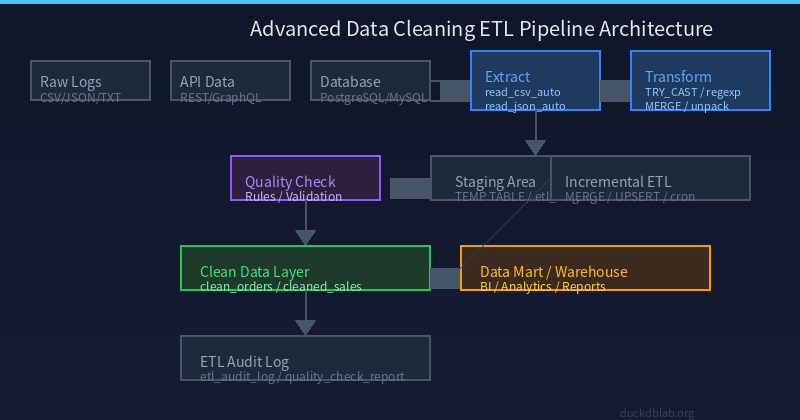
Fig: Nginx log parsing architecture — from raw text to structured columns
Timestamp Conversion and Normalization
-- Convert parsed timestamp strings to TIMESTAMP and extract useful dimensions
CREATE TABLE parsed_access_logs AS
SELECT
    client_ip,
    remote_user,
    TRY_CAST(timestamp_str AS TIMESTAMP) AS log_time,
    http_method,
    request_path,
    status_code::INTEGER AS status,
    response_size::BIGINT AS bytes_sent,
    user_agent,
    -- Extract URL path category
    CASE
        WHEN request_path LIKE '/api/%' THEN 'api'
        WHEN request_path LIKE '/static/%' THEN 'static'
        WHEN request_path LIKE '/images/%' THEN 'images'
        ELSE 'other'
    END AS path_category,
    -- Determine if search engine bot
    CASE
        WHEN user_agent ILIKE '%googlebot%' THEN 'google'
        WHEN user_agent ILIKE '%bingbot%' THEN 'bing'
        WHEN user_agent ILIKE '%baiduspider%' THEN 'baidu'
        ELSE 'human'
    END AS bot_type,
    -- Categorize response status
    CASE
        WHEN status BETWEEN 200 AND 299 THEN 'success'
        WHEN status BETWEEN 300 AND 399 THEN 'redirect'
        WHEN status BETWEEN 400 AND 499 THEN 'client_error'
        WHEN status BETWEEN 500 AND 599 THEN 'server_error'
        ELSE 'unknown'
    END AS status_category
FROM nginx_access_logs
WHERE TRY_CAST(timestamp_str AS TIMESTAMP) IS NOT NULL;

-- Verify conversion results
SELECT
    path_category,
    bot_type,
    status_category,
    COUNT(*) AS request_count,
    ROUND(AVG(bytes_sent)) AS avg_bytes
FROM parsed_access_logs
GROUP BY path_category, bot_type, status_category
ORDER BY request_count DESC;
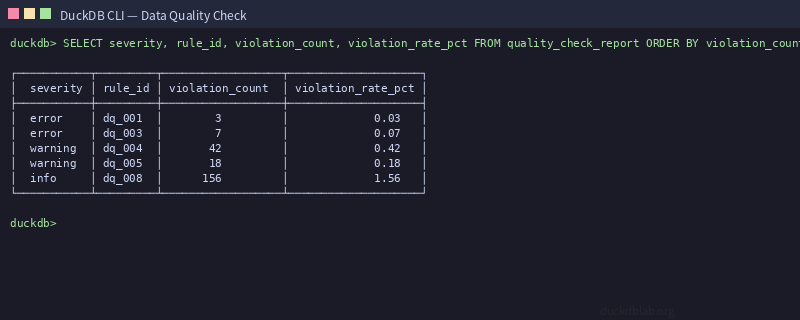
Fig: DuckDB CLI output showing log parsing SQL execution results
Scenario 2: Cleaning Mixed-Format CSV Data
Problem Background
During a data migration, you received sales data from three different suppliers, each using a different CSV format:
- Supplier A: Standard format, comma-separated, dates as
YYYY-MM-DD - Supplier B: Semicolon-separated, dates as
DD/MM/YYYY, prices in European format (.as thousands separator,,as decimal point) - Supplier C: Tab-separated, contains multi-line string fields (wrapped in double quotes), date field may be missing
Unified Cleaning Pipeline
-- Step 1: Read data in three different formats
CREATE TEMP TABLE supplier_a AS
SELECT
    order_id,
    TRY_CAST(customer_id AS INTEGER) AS customer_id,
    product_name,
    TRY_CAST(REPLACE(price, '.', '') AS DECIMAL(12,2)) AS price,
    TRY_CAST(date AS DATE) AS order_date,
    quantity,
    'supplier_a' AS source
FROM read_csv_auto('data/supplier_a.csv', sep=',');

CREATE TEMP TABLE supplier_b AS
SELECT
    order_id,
    TRY_CAST(customer_id AS INTEGER) AS customer_id,
    product_name,
    TRY_CAST(REPLACE(REPLACE(price, '.', ''), ',', '.') AS DECIMAL(12,2)) AS price,
    TRY_CAST(strptime(date, '%d/%m/%Y') AS DATE) AS order_date,
    TRY_CAST(quantity AS INTEGER) AS quantity,
    'supplier_b' AS source
FROM read_csv_auto('data/supplier_b.csv', sep=';');

CREATE TEMP TABLE supplier_c AS
SELECT
    order_id,
    TRY_CAST(customer_id AS INTEGER) AS customer_id,
    product_name,
    TRY_CAST(price AS DECIMAL(12,2)) AS price,
    TRY_CAST(date AS DATE) AS order_date,
    TRY_CAST(quantity AS INTEGER) AS quantity,
    'supplier_c' AS source
FROM read_csv_auto('data/supplier_c.tsv', sep='\t');

-- Step 2: Merge and unify formats
CREATE TABLE unified_sales AS
SELECT order_id, customer_id, product_name, price, order_date, quantity, source
FROM supplier_a
UNION ALL
SELECT order_id, customer_id, product_name, price, order_date, quantity, source
FROM supplier_b
UNION ALL
SELECT order_id, customer_id, product_name, price, order_date, quantity, source
FROM supplier_c;

-- Step 3: Data quality checks
SELECT
    source,
    COUNT(*) AS total_records,
    COUNT(order_id) AS valid_ids,
    COUNT(customer_id) AS valid_customers,
    COUNT(order_date) AS valid_dates,
    COUNT(price) AS valid_prices,
    COUNT(quantity) AS valid_quantities,
    ROUND(AVG(price), 2) AS avg_price,
    MIN(price) AS min_price,
    MAX(price) AS max_price
FROM unified_sales
GROUP BY source;
Handling Duplicate Orders and Conflicting Data
-- Detect duplicate orders across suppliers
SELECT
    order_id,
    COUNT(*) AS occurrence_count,
    GROUP_CONCAT(DISTINCT source) AS sources,
    GROUP_CONCAT(DISTINCT customer_id) AS customer_ids,
    SUM(price) AS total_price_sum
FROM unified_sales
GROUP BY order_id
HAVING COUNT(*) > 1;

-- Smart deduplication: prefer records with most complete data
CREATE TABLE deduplicated_sales AS
WITH ranked AS (
    SELECT *,
        row_number() OVER (
            PARTITION BY order_id
            ORDER BY
                CASE WHEN order_date IS NOT NULL THEN 0 ELSE 1 END,
                CASE WHEN customer_id IS NOT NULL THEN 0 ELSE 1 END,
                CASE source WHEN 'supplier_a' THEN 0 WHEN 'supplier_b' THEN 1 ELSE 2 END
        ) AS rank
    FROM unified_sales
)
SELECT * FROM ranked WHERE rank = 1;

SELECT COUNT(*) AS original_count FROM unified_sales;
SELECT COUNT(*) AS deduplicated_count FROM deduplicated_sales;
Scenario 3: Cleaning Nested JSON Data
Problem Background
An e-commerce platform returns order data as nested JSON via API, containing order basics, product list, shipping address, and payment method. We need to flatten this into a relational table.
Flattening Nested JSON
-- Read nested JSON order data
CREATE TABLE raw_orders_json AS
SELECT * FROM read_json_auto('data/orders.json');

-- Use JSON unpacking to flatten nested structure
CREATE TABLE flattened_orders AS
SELECT
    o.order_id,
    o.customer_id,
    o.order_time,
    o.status,
    item.product_id,
    item.product_name,
    item.quantity,
    item.unit_price,
    item.discount_percent,
    addr.country,
    addr.province,
    addr.city,
    addr.district,
    addr.full_address,
    payment.method,
    payment.amount AS paid_amount,
    payment.transaction_id
FROM raw_orders_json o,
    LATERAL unpack(o.items) AS item,
    LATERAL o.shipping_address AS addr,
    LATERAL unpack(o.payments) AS payment;

-- View flattened results
SELECT * FROM flattened_orders LIMIT 10;
JSON Data Cleaning and Validation
-- Clean and validate flattened data
CREATE TABLE clean_orders AS
SELECT
    order_id,
    TRY_CAST(customer_id AS BIGINT) AS customer_id,
    TRY_CAST(order_time AS TIMESTAMP) AS order_time,
    LOWER(TRIM(status)) AS order_status,
    TRY_CAST(product_id AS BIGINT) AS product_id,
    TRIM(product_name) AS product_name,
    GREATEST(TRY_CAST(quantity AS INTEGER), 0) AS quantity,
    GREATEST(TRY_CAST(unit_price AS DECIMAL(10,2)), 0) AS unit_price,
    LEAST(GREATEST(TRY_CAST(discount_percent AS DECIMAL(5,2)), 0), 100) AS discount,
    UPPER(country) AS country,
    TRIM(province) AS province,
    TRIM(city) AS city,
    REPLACE(full_address, E'\n', ' ') AS address_clean,
    UPPER(method) AS pay_method,
    TRY_CAST(paid_amount AS DECIMAL(12,2)) AS paid_amount,
    TRIM(transaction_id) AS txn_id
FROM flattened_orders
WHERE TRY_CAST(customer_id AS BIGINT) IS NOT NULL
  AND TRY_CAST(unit_price AS DECIMAL(10,2)) IS NOT NULL;

-- Data statistics
SELECT
    order_status,
    pay_method,
    COUNT(DISTINCT order_id) AS order_count,
    COUNT(*) AS line_item_count,
    ROUND(SUM(unit_price * quantity * (1 - discount/100)), 2) AS total_revenue,
    ROUND(AVG(paid_amount), 2) AS avg_payment
FROM clean_orders
GROUP BY order_status, pay_method
ORDER BY order_count DESC;
Scenario 4: Production-Grade Data Quality Validation Framework
Quality Rule Definition
In production environments, data cleaning isn’t just about format conversion — it requires automated quality validation mechanisms. DuckDB supports defining quality rules through SQL and generating reports:
-- Create data quality rules table
CREATE TABLE data_quality_rules (
    rule_id VARCHAR PRIMARY KEY,
    table_name VARCHAR,
    column_name VARCHAR,
    rule_type VARCHAR,
    rule_expression VARCHAR,
    severity VARCHAR,
    description VARCHAR
);

-- Insert quality rules
INSERT INTO data_quality_rules VALUES
('dq_001', 'clean_orders', 'order_id', 'not_null', 'order_id IS NOT NULL', 'error', 'Order ID must not be null'),
('dq_002', 'clean_orders', 'customer_id', 'not_null', 'customer_id IS NOT NULL', 'error', 'Customer ID must not be null'),
('dq_003', 'clean_orders', 'unit_price', 'positive', 'unit_price > 0', 'error', 'Unit price must be positive'),
('dq_004', 'clean_orders', 'quantity', 'range', 'quantity >= 1 AND quantity <= 999', 'warning', 'Quantity should be between 1 and 999'),
('dq_005', 'clean_orders', 'discount', 'range', 'discount >= 0 AND discount <= 100', 'warning', 'Discount should be between 0 and 100 percent'),
('dq_006', 'clean_orders', 'order_time', 'not_null', 'order_time IS NOT NULL', 'error', 'Order time must not be null'),
('dq_007', 'clean_orders', 'paid_amount', 'match', 'ABS(paid_amount - unit_price * quantity * (1 - discount/100)) < 0.01', 'warning', 'Paid amount should match calculated amount'),
('dq_008', 'clean_orders', 'country', 'pattern', 'country REGEXP /^[A-Z]{2}$/', 'info', 'Country code should be 2 uppercase letters');
Note: DuckDB doesn’t have an
EVALUATE_EXPRESSIONfunction. Below is a practical Python implementation:
import duckdb

con = duckdb.connect('orders.duckdb')

def run_quality_checks(conn, table_name, rules):
    """Execute data quality checks"""
    results = []
    total_rows = conn.execute(f"SELECT COUNT(*) FROM {table_name}").fetchone()[0]

    for rule in rules:
        rule_id = rule['rule_id']
        condition = rule['condition']
        severity = rule['severity']
        description = rule['description']

        query = f"SELECT COUNT(*) FROM {table_name} WHERE NOT ({condition})"
        violation_count = conn.execute(query).fetchone()[0]
        rate = violation_count * 100.0 / total_rows if total_rows > 0 else 0

        results.append({
            'rule_id': rule_id,
            'table': table_name,
            'violation_count': violation_count,
            'violation_rate_pct': round(rate, 2),
            'severity': severity,
            'description': description,
            'total_rows': total_rows
        })

    return results

rules = [
    {'rule_id': 'dq_001', 'condition': 'order_id IS NOT NULL', 'severity': 'error', 'description': 'Order ID must not be null'},
    {'rule_id': 'dq_002', 'condition': 'customer_id IS NOT NULL', 'severity': 'error', 'description': 'Customer ID must not be null'},
    {'rule_id': 'dq_003', 'condition': 'unit_price > 0', 'severity': 'error', 'description': 'Unit price must be positive'},
    {'rule_id': 'dq_004', 'condition': 'quantity >= 1 AND quantity <= 999', 'severity': 'warning', 'description': 'Quantity should be between 1 and 999'},
    {'rule_id': 'dq_005', 'condition': 'discount >= 0 AND discount <= 100', 'severity': 'warning', 'description': 'Discount should be between 0 and 100 percent'},
]

report = run_quality_checks(con, 'clean_orders', rules)
con.execute("CREATE TABLE quality_check_report AS SELECT * FROM report")

for r in report:
    print(f"[{r['severity'].upper()}] {r['rule_id']}: {r['violation_count']} violations ({r['violation_rate_pct']}%) - {r['description']}")
Quality Report Summary Query
-- Summarize quality report
SELECT
    severity,
    rule_id,
    description,
    violation_count,
    violation_rate_pct,
    total_rows,
    CASE
        WHEN severity = 'error' AND violation_count > 0 THEN 'BLOCK'
        WHEN severity = 'warning' AND violation_rate_pct > 5 THEN 'REVIEW'
        ELSE 'PASS'
    END AS action_required
FROM quality_check_report
ORDER BY
    CASE severity WHEN 'error' THEN 0 WHEN 'warning' THEN 1 ELSE 2 END,
    violation_count DESC;
Scenario 5: Incremental ETL and Data Synchronization
Incremental Update Pattern
In production, data is typically updated incrementally. We need to design an ETL flow that handles incremental updates:
-- Create incremental ETL stored procedure
CREATE OR REPLACE PROCEDURE incremental_etl_load()
LANGUAGE SQL
AS $$
BEGIN
    -- Step 1: Create incremental staging table
    CREATE TEMP TABLE IF NOT EXISTS etl_staging AS
    SELECT * FROM read_csv_auto('data/incremental_orders_2026-09.csv')
    WHERE 1=0;

    -- Step 2: Load incremental data
    INSERT INTO etl_staging
    SELECT * FROM read_csv_auto('data/incremental_orders_2026-09.csv');

    -- Step 3: Upsert logic
    MERGE INTO clean_orders AS target
    USING etl_staging AS source
    ON target.order_id = source.order_id
    WHEN MATCHED THEN
        UPDATE SET
            customer_id = source.customer_id,
            order_time = source.order_time,
            status = source.status,
            updated_at = CURRENT_TIMESTAMP
    WHEN NOT MATCHED THEN
        INSERT (order_id, customer_id, product_id, product_name,
                quantity, unit_price, discount, order_time, status)
        VALUES (
            source.order_id, source.customer_id, source.product_id,
            source.product_name, source.quantity, source.unit_price,
            source.discount, source.order_time, source.status
        );

    -- Step 4: Record ETL metadata
    INSERT INTO etl_audit_log (
        load_type, source_file, rows_loaded, rows_updated,
        rows_inserted, started_at, completed_at
    )
    SELECT
        'incremental',
        'incremental_orders_2026-09.csv',
        (SELECT COUNT(*) FROM etl_staging),
        (SELECT COUNT(*) FROM clean_orders WHERE updated_at > CURRENT_DATE - 1),
        (SELECT COUNT(*) FROM etl_staging s LEFT JOIN clean_orders c ON s.order_id = c.order_id WHERE c.order_id IS NULL),
        CURRENT_TIMESTAMP - INTERVAL '5' SECOND,
        CURRENT_TIMESTAMP;
END;
$$;

-- Execute incremental ETL
CALL incremental_etl_load();
ETL Audit Log
-- Create audit log table
CREATE TABLE IF NOT EXISTS etl_audit_log (
    log_id BIGINT AUTO_INCREMENT PRIMARY KEY,
    load_type VARCHAR,
    source_file VARCHAR,
    rows_loaded INTEGER,
    rows_updated INTEGER,
    rows_inserted INTEGER,
    started_at TIMESTAMP,
    completed_at TIMESTAMP,
    duration_seconds DOUBLE,
    status VARCHAR
);

-- Calculate execution duration
UPDATE etl_audit_log
SET
    duration_seconds = (completed_at - started_at)::DOUBLE,
    status = 'SUCCESS'
WHERE completed_at IS NOT NULL AND status IS NULL;

-- Query ETL performance trends
SELECT
    DATE(started_at) AS load_date,
    load_type,
    COUNT(*) AS run_count,
    AVG(duration_seconds) AS avg_duration,
    SUM(rows_loaded) AS total_rows,
    SUM(rows_inserted) AS total_inserted,
    SUM(rows_updated) AS total_updated
FROM etl_audit_log
GROUP BY DATE(started_at), load_type
ORDER BY load_date DESC, load_type;
Summary and Best Practices
This article covered five core scenarios of advanced data cleaning and ETL pipelines in DuckDB:
| Scenario | Core Technique | Key Functions |
|---|---|---|
| Log Parsing | Regular Expressions | regexp_extract, regexp_match |
| Mixed Format Cleaning | Multi-source Merge | read_csv_auto, strptime, UNION ALL |
| JSON Flattening | Nested Unpacking | unpack, LATERAL |
| Quality Validation | Rule Engine | Dynamic SQL + Python scripting |
| Incremental ETL | Upsert | MERGE, PROCEDURE |
Production recommendations:
- Layered processing: raw → staging → clean → mart, with clear quality gates at each layer
- Keep audit trails: Raw data is always read-only; all cleaned results go to new tables
- Quality gates: Critical rules (e.g., primary key uniqueness, required fields not null) block downstream if they fail
- Incremental first: Use
MERGEor window functions for incremental updates instead of full reruns - Monitoring & alerting: Feed quality reports into alerting systems; auto-notify when anomaly rates exceed thresholds
Fig: Advanced data cleaning ETL architecture — from multi-source dirty data to high-quality data warehouse
Fig: DuckDB CLI output showing incremental ETL quality check results
For more DuckDB实战技巧, visit DuckDB Lab (duckdblab.org).
本文信息
| 项目 | 内容 |
|---|---|
| DuckDB 版本 | v1.5.x(部分功能基于 v2.0 Preview) |
| 最后验证 | 2026-09-12 |
| 测试环境 | Linux / x86_64 / 16GB RAM |
| 官方文档 | DuckDB Documentation |
| GitHub | pengzz9527/duckdb-blog |
如发现错误,欢迎通过 GitHub Issue 或邮件 contact@duckdblab.org 反馈。