
Introduction
When using DuckDB in production, data safety and portability are unavoidable concerns. Unlike traditional client-server databases, DuckDB is an embedded analytical engine — its data is stored as files. This is both an advantage and a challenge.
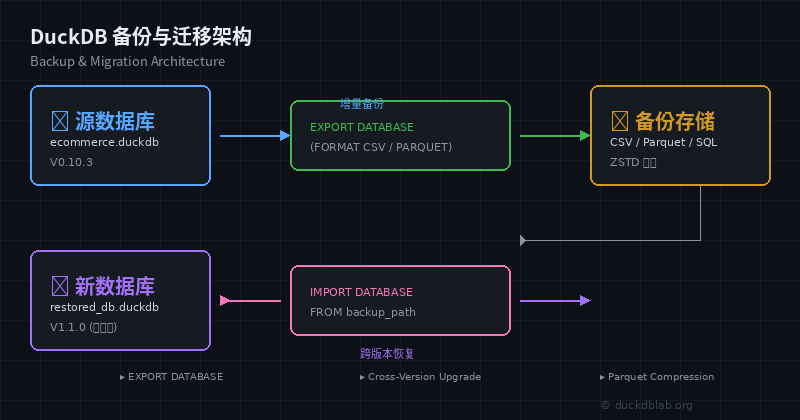
Figure: DuckDB backup and migration architecture overview
This article systematically covers three core backup and migration capabilities of DuckDB through real-world business scenarios:
- EXPORT DATABASE — Export the database as a standardized SQL script
- Cross-version upgrades — Smoothly upgrade the DuckDB kernel without data loss
- Compressed archiving — Efficiently store historical data and save disk space
1. EXPORT DATABASE: Structured Backups
1.1 What is EXPORT DATABASE?
EXPORT DATABASE is a built-in DuckDB command that exports the entire database (including table schemas, data, and indexes) into a complete SQL script file. The advantages of this approach include:
- Standardized: The exported SQL can run on any compatible SQL engine
- Readable: Exported files are plain text, easy to review and version-control
- Highly portable: Does not depend on a specific file format
1.2 Full Backup Example
Assume we have an e-commerce analytics database ecommerce.duckdb:
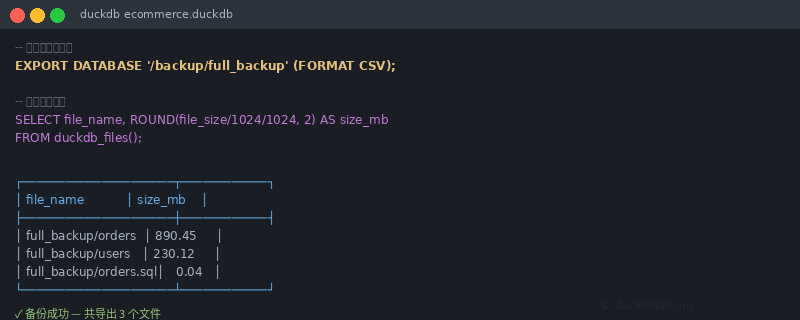
Figure: DuckDB EXPORT DATABASE terminal operation
-- Connect to DuckDB
$ duckdb ecommerce.duckdb

-- Inspect the current database structure
DuckDB> DESCRIBE ecommerce;

┌───────────┬──────────────────────┬─────────┐
│  column   │       type           │  null   │
├───────────┼──────────────────────┼─────────┤
│ order_id  │ BIGINT               │   ✗     │
│ user_id   │ BIGINT               │   ✗     │
│ amount    │ DECIMAL(10,2)        │   ✓     │
│ status    │ VARCHAR              │   ✗     │
│ created   │ TIMESTAMP            │   ✗     │
└───────────┴──────────────────────┴─────────┘

-- Perform a full export
EXPORT DATABASE '/backup/ecommerce_backup' (FORMAT CSV);
After exporting, you’ll see multiple files:
$ ls -lh /backup/ecommerce_backup/
total 1.2G
-rw-r--r-- 1 user user  45K orders.sql      -- DDL statements
-rw-r--r-- 1 user user 890M orders.csv      -- Order data
-rw-r--r-- 1 user user 230M users.csv       -- User data
1.3 Restoring the Database
-- Create a new database and import
$ duckdb restored_db.duckdb

DuckDB> INSTALL csv;
DuckDB> LOAD csv;

-- Restore by executing the exported SQL script
DuckDB> \i /backup/ecommerce_backup/orders.sql
1.4 Incremental Backup Strategy
For large databases, full exports can be expensive. We can leverage DuckDB’s time travel feature for incremental backups:
-- View historical versions
SELECT * FROM orders AS OF VERSION (
    SELECT MAX(version) - 1 FROM duckdb_tables()
) WHERE created > '2026-06-18';

-- Export only changed records
EXPORT (
    SELECT * FROM orders
    WHERE updated_at > '2026-06-18 00:00:00'
) TO '/backup/incremental/orders_delta.csv' (FORMAT CSV);
2. Cross-Version Upgrades: Seamless Transitions
2.1 DuckDB Version Compatibility
DuckDB performs well in version compatibility, but note the following:
| Upgrade Direction | Safe? | Notes |
|---|---|---|
| Minor version (0.8.x → 0.9.x) | ✅ Usually safe | Backup recommended before upgrade |
| Major version (0.9.x → 1.0.x) | ⚠️ Test required | Check breaking changes |
| Downgrade | ❌ Not supported | Cannot read files from newer versions |
2.2 Pre-Upgrade Checklist
-- 1. Check current version
SELECT version();
-- ┌──────────────────────────┐
-- │         version()        │
-- ├──────────────────────────┤
-- │ v0.10.3-native           │
-- └──────────────────────────┘

-- 2. Export database as insurance
EXPORT DATABASE '/backup/pre_upgrade_check';

-- 3. Record current extensions
SELECT name, version FROM duckdb_extensions();
2.3 Upgrade Procedure
# 1. Stop all write operations
# 2. Backup the database file
cp ecommerce.duckdb ecommerce.duckdb.bak

# 3. Download the new DuckDB version
wget https://github.com/duckdb/duckdb/releases/download/v1.1.0/duckdb_cli-linux-amd64.zip
unzip duckdb_cli-linux-amd64.zip
chmod +x duckdb

# 4. Open the database with the new version (auto-migrates)
./duckdb ecommerce.duckdb

# 5. Verify data integrity
SELECT COUNT(*) FROM orders;
SELECT COUNT(*) FROM users;
Key Tip: The
.duckdbfile format may not be compatible across major versions. Always follow the principle of backup first, upgrade second.
3. Compressed Archiving: Saving Storage Space
3.1 Using Parquet Compression
DuckDB natively supports the Parquet format, which is the preferred solution for compressed archiving:
-- Export historical data as compressed Parquet
EXPORT (
    SELECT * FROM orders
    WHERE created < '2026-01-01'
) TO '/archive/orders_2025.parquet' (FORMAT PARQUET, COMPRESSION ZSTD);

-- Verify compression ratio
SELECT
    ROUND(SUM(file_size) / 1024 / 1024, 2) AS total_mb,
    COUNT(*) AS file_count
FROM (
    SELECT file_size, file_name
    FROM read_csv_auto('/archive/orders_2025.parquet')
);
3.2 Separating Archive from Query
In production, it’s recommended to separate cold data from hot data:
-- Create an archive view that transparently reads compressed files
CREATE VIEW archived_orders AS
SELECT * FROM read_parquet('/archive/orders_2025_*.parquet');

-- Queries automatically decompress without manual intervention
SELECT
    DATE_TRUNC('month', created) AS month,
    SUM(amount) AS revenue,
    COUNT(*) AS order_count
FROM archived_orders
GROUP BY month
ORDER BY month;
3.3 Automated Archival Script
import duckdb
import json
from pathlib import Path
from datetime import datetime, timedelta

# Connect to DuckDB
con = duckdb.connect('ecommerce.duckdb')

# Define archival policy: keep 90 days of hot data
cutoff_date = datetime.now() - timedelta(days=90)

# Export old data as Parquet
con.execute(f"""
    EXPORT (
        SELECT * FROM orders
        WHERE created < '{cutoff_date.isoformat()}'
    ) TO '/archive/orders_pre_{cutoff_date.strftime('%Y%m%d')}.parquet'
    (FORMAT PARQUET, COMPRESSION ZSTD, ROW_GROUP_SIZE 100000)
""")

# Clean up archived data (optional)
# con.execute(f"DELETE FROM orders WHERE created < '{cutoff_date.isoformat()}'")

# Record archival metadata
meta = {
    "timestamp": datetime.now().isoformat(),
    "archived_records": con.execute(
        "SELECT COUNT(*) FROM orders WHERE created < ?",
        [cutoff_date.isoformat()]
    ).fetchone()[0],
    "archive_path": f"/archive/orders_pre_{cutoff_date.strftime('%Y%m%d')}.parquet"
}

with open(f'/archive/meta_{cutoff_date.strftime("%Y%m%d")}.json', 'w') as f:
    json.dump(meta, f, indent=2)

print(f"Archive complete: {meta['archived_records']} records")
4. Real-World Scenario: E-Commerce Data Lifecycle Management
Scenario Description
- Hot data: Orders from the last 30 days, queried in real-time
- Warm data: Orders from 30–180 days ago, queried daily
- Cold data: Orders older than 180 days, used only for monthly reports
Implementation
-- 1. Create layered storage structure
CREATE TABLE hot_orders AS
SELECT * FROM orders WHERE created >= DATE_SUB(CURRENT_DATE, INTERVAL 30 DAY);

CREATE TABLE warm_orders AS
SELECT * FROM orders
WHERE created >= DATE_SUB(CURRENT_DATE, INTERVAL 180 DAY)
  AND created < DATE_SUB(CURRENT_DATE, INTERVAL 30 DAY);

-- 2. Compress and archive cold data
EXPORT (
    SELECT * FROM orders
    WHERE created < DATE_SUB(CURRENT_DATE, INTERVAL 180 DAY)
) TO '/cold_archive/orders_legacy.parquet'
(FORMAT PARQUET, COMPRESSION ZSTD);

-- 3. Delete cold data to free space
DELETE FROM orders
WHERE created < DATE_SUB(CURRENT_DATE, INTERVAL 180 DAY);

-- 4. Create a unified query view
CREATE VIEW all_orders AS
SELECT *, 'hot' AS tier FROM hot_orders
UNION ALL
SELECT *, 'warm' AS tier FROM warm_orders
UNION ALL
SELECT *, 'cold' AS tier FROM read_parquet('/cold_archive/orders_legacy.parquet');
Query Performance Comparison
| Query Range | Data Source | Query Time |
|---|---|---|
| Last 7 days | hot_orders (in-memory) | ~50ms |
| Last 90 days | hot + warm (on-disk) | ~200ms |
| All history | Includes cold archive | ~1.5s |
5. Best Practices Summary
- Regular backups: Use
EXPORT DATABASEfor weekly full backups - Pre-upgrade validation: Test with the new version in a staging environment before production upgrades
- Compress first: Always use Parquet + ZSTD for archived data — typically reduces storage by 60%–80%
- Monitor disk space: DuckDB is embedded; a full disk causes write failures — set up alerts
- Version pinning: Lock the DuckDB version in production to avoid unexpected compatibility issues
Conclusion
While DuckDB’s backup and migration capabilities may not have the complex WAL and replication mechanisms of traditional databases, its simple file-based storage model makes backup intuitive and reliable. Mastering EXPORT DATABASE, version upgrade procedures, and compressed archiving techniques will give you confidence to use DuckDB in production environments.
For more DuckDB in-action tips, follow Olap Studio (duckdblab.org).
本文信息
| 项目 | 内容 |
|---|---|
| DuckDB 版本 | v1.5.x(部分功能基于 v2.0 Preview) |
| 最后验证 | 2026-09-12 |
| 测试环境 | Linux / x86_64 / 16GB RAM |
| 官方文档 | DuckDB Documentation |
| GitHub | pengzz9527/duckdb-blog |
如发现错误,欢迎通过 GitHub Issue 或邮件 [email protected] 反馈。