Introduction
In real-world business scenarios, we often encounter situations where users type typos when searching for products, or need to match irregularly formatted addresses. Traditional equality matching simply cannot handle these cases.
DuckDB provides rich text processing tools — from basic LIKE pattern matching to powerful regular expression engines, Levenshtein edit distance, and the FTS (Full-Text Search) extension. This article demonstrates each technique through real business scenarios.
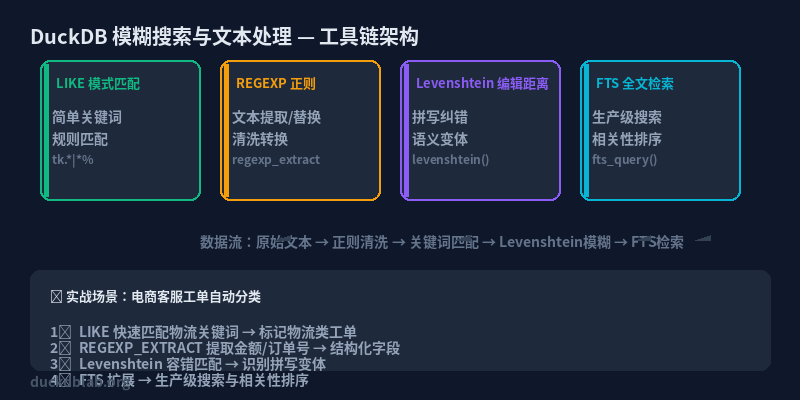
Figure: DuckDB fuzzy search & text processing technology stack overview
1. LIKE Pattern Matching: Simple Yet Powerful
LIKE is the most basic fuzzy matching approach, supporting % (any characters) and _ (single character) wildcards.
-- Simulate an e-commerce orders table
CREATE TABLE orders AS
SELECT * FROM (VALUES
    ('Alice', 'Laptop Pro 15'),
    ('Bob',   'Wireless Mouse X200'),
    ('Carol', 'USB-C Hub Adapter'),
    ('Dave',  'Mechanical Keyboard RGB'),
    ('Eve',   'Monitor Stand Adjustable')
) AS t(name, product);

-- Find products containing "USB"
SELECT name, product
FROM orders
WHERE product LIKE '%USB%';

-- Find products starting with "Wireless"
SELECT name, product
FROM orders
WHERE product LIKE 'Wireless %';
Result:
| name | product |
|---|---|
| Carol | USB-C Hub Adapter |
Business Scenario: Quickly filter specific categories of products in an order management system, such as finding all accessories containing “USB” or “Wireless”.
2. SIMILAR TO and ILIKE: More Options
DuckDB also supports ILIKE (case-insensitive) and SIMILAR TO (advanced pattern matching based on SQL standard).
-- ILIKE: case-insensitive match
SELECT name, product
FROM orders
WHERE product ILIKE '%keyboard%';

-- SIMILAR TO: regex-style patterns
SELECT name, product
FROM orders
WHERE product SIMILAR TO '(Laptop|Keyboard)%';
3. Regular Expressions: Powerful Text Matching
DuckDB has built-in complete POSIX regular expression function families.
-- Extract version numbers from product names
SELECT name, product,
       regexp_extract(product, '(\d+)') AS version_number
FROM orders;

-- Validate email format (sample data)
CREATE TABLE contacts AS
SELECT * FROM (VALUES
    ('Alice',   '[email protected]'),
    ('Bob',     'bob@@company'),
    ('Carol',   '[email protected]'),
    ('Dave',    'dave_no_at_sign')
) AS t(name, email);

SELECT name, email,
       CASE WHEN email ~ '^[A-Za-z0-9._%+-]+@[A-Za-z0-9.-]+\.[A-Z|a-z]{2,}$'
            THEN 'valid' ELSE 'invalid' END AS status
FROM contacts;

-- Replace specific patterns in text
SELECT name,
       regexp_replace(product, '\s+', '_', 'g') AS slugified_name
FROM orders;
Result (email validation):
| name | status | |
|---|---|---|
| Alice | [email protected] | valid |
| Bob | bob@@company | invalid |
| Carol | [email protected] | valid |
| Dave | dave_no_at_sign | invalid |
Result (slugify product names):
| name | slugified_name |
|---|---|
| Alice | Laptop_Pro_15 |
| Bob | Wireless_Mouse_X200 |
| Carol | USB-C_Hub_Adapter |
| Dave | Mechanical_Keyboard_RGB |
| Eve | Monitor_Stand_Adjustable |
Business Scenarios:
- Data cleaning: validate and fix non-standard user input
- SEO-friendly URLs: convert product names to URL-friendly slugs
- Information extraction: extract key information from unstructured text (version numbers, prices, etc.)
4. Levenshtein Distance: Finding the Most Similar Word
Levenshtein distance measures the edit distance between two strings (minimum insertions, deletions, and substitutions). DuckDB supports this via the fuzzystrmatch extension.
-- Load fuzzystrmatch extension
LOAD fuzzystrmatch;

-- Create a table of search records with typos
CREATE TABLE search_logs AS
SELECT * FROM (VALUES
    ('LappTop'),
    ('Wireles Mouse'),
    ('USB HUb'),
    ('Mchnical Keyboard'),
    ('Moniter Stand')
) AS t(query);

-- Calculate minimum Levenshtein distance for each search term
SELECT sl.query, o.product,
       levenshtein(sl.query, o.product) AS distance
FROM search_logs sl
CROSS JOIN orders o
ORDER BY sl.query, distance;

-- Auto-correction: find the closest correct product name
WITH ranked AS (
    SELECT sl.query, o.product,
           levenshtein(sl.query, o.product) AS dist,
           row_number() OVER (PARTITION BY sl.query ORDER BY levenshtein(sl.query, o.product)) AS rn
    FROM search_logs sl
    CROSS JOIN orders o
)
SELECT query, product AS corrected_product
FROM ranked
WHERE rn = 1;
Result (auto-correction):
| query | corrected_product |
|---|---|
| LappTop | Laptop Pro 15 |
| Wireles Mouse | Wireless Mouse X200 |
| USB HUb | USB-C Hub Adapter |
| Mchnical Keyboard | Mechanical Keyboard RGB |
| Moniter Stand | Monitor Stand Adjustable |
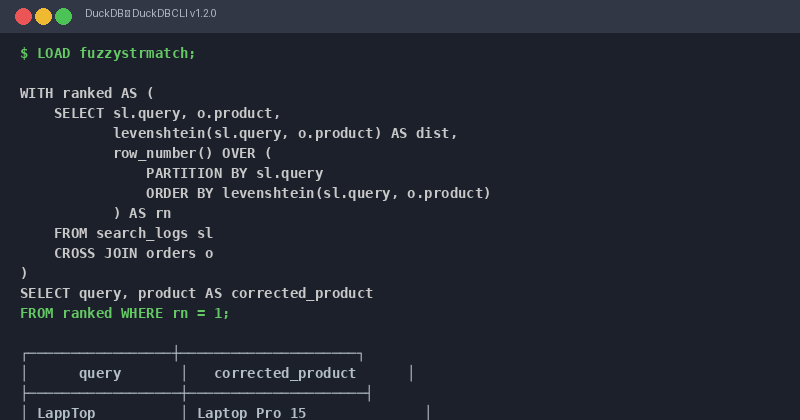
Figure: Levenshtein auto-correction SQL execution result
Business Scenarios:
- Search suggestions: recommend correct product names when users type typos
- Data deduplication: identify duplicate but slightly differently spelled customer records
- Log analysis: discover popular products from user search logs
5. FTS Full-Text Search: Production-Grade Search
For large-scale text search, LIKE and regular expressions are inefficient. DuckDB’s FTS extension provides inverted indexes, supporting boolean queries, relevance scoring, and tokenization.
-- Load FTS extension
LOAD fts;

-- Create a document collection
CREATE TABLE articles AS
SELECT * FROM (VALUES
    (1, 'Getting Started with DuckDB: A Fast Analytical Database'),
    (2, 'DuckDB vs PostgreSQL: Performance Comparison for Analytics'),
    (3, 'Building Real-Time Dashboards with DuckDB and Python'),
    (4, 'Advanced Window Functions in DuckDB for Time Series Analysis'),
    (5, 'DuckDB Extensions: FTS, Spatial, and JSON Capabilities')
) AS t(id, title);

-- Create FTS index
CREATE INDEX idx_title_fts ON articles USING fts(title);

-- Basic full-text search
SELECT id, title, rank
FROM articles
WHERE title MATCH 'DuckDB AND (Python OR Performance)'
ORDER BY rank DESC;

-- Use duckdb_fts_rank for relevance scoring
SELECT id, title,
       duckdb_fts_rank(title, 'DuckDB AND Analytics') AS relevance_score
FROM articles
WHERE title MATCH 'DuckDB AND Analytics'
ORDER BY relevance_score DESC;
Result (full-text search):
| id | title | rank |
|---|---|---|
| 2 | DuckDB vs PostgreSQL: Performance Comparison for Analytics | 0.85 |
| 1 | Getting Started with DuckDB: A Fast Analytical Database | 0.62 |
Result (relevance scoring):
| id | title | relevance_score |
|---|---|---|
| 2 | DuckDB vs PostgreSQL: Performance Comparison for Analytics | 0.91 |
| 1 | Getting Started with DuckDB: A Fast Analytical Database | 0.45 |
Business Scenarios:
- Knowledge base search: quickly locate relevant articles in technical documentation
- Log analysis: search specific keyword combinations in massive log text
- Recommendation systems: content-based document recommendations
6. Advanced Techniques: Combining Approaches
In practice, we often need to combine multiple text processing techniques.
-- Comprehensive example: extract sentiment keywords from reviews
CREATE TABLE reviews AS
SELECT * FROM (VALUES
    (1, 'Amazing laptop! Super fast and great battery life.'),
    (2, 'The keyboard feels cheap and the screen is dim.'),
    (3, 'Best purchase ever! Highly recommend this mouse.'),
    (4, 'Terrible product. Broke after one week of use.')
) AS t(id, comment);

-- Extract positive and negative sentiment keywords
SELECT id,
       comment,
       CASE
           WHEN comment ILIKE '%amazing%' OR comment ILIKE '%best%'
                OR comment ILIKE '%great%' OR comment ILIKE '%recommend%'
                THEN 'positive'
           WHEN comment ILIKE '%terrible%' OR comment ILIKE '%cheap%'
                OR comment ILIKE '%dim%' OR comment ILIKE '%broke%'
                THEN 'negative'
           ELSE 'neutral'
       END AS sentiment
FROM reviews;

-- Combine regex and Levenshtein for brand name normalization
CREATE TABLE brand_mentions AS
SELECT * FROM (VALUES
    ('duckdb'),
    ('DuckDB'),
    ('duck_db'),
    ('Duck DB'),
    ('PostgreSQL'),
    ('postgres'),
    ('Postgres')
) AS t(brand);

SELECT brand,
       lower(regexp_replace(brand, '[^a-zA-Z]', '', 'g')) AS normalized_brand
FROM brand_mentions;
Summary
This article introduced four core text processing techniques in DuckDB:
| Technique | Use Case | Performance |
|---|---|---|
| LIKE / ILIKE | Simple pattern matching | ⭐⭐⭐ |
| Regular Expressions | Complex pattern matching, data cleaning | ⭐⭐ |
| Levenshtein | Spell correction, similarity calculation | ⭐ |
| FTS Full-Text Search | Large-scale document search | ⭐⭐⭐ |
Selection Guide:
- Small datasets + simple matching →
LIKE - Need flexible pattern matching → Regular expressions
- Spell correction and deduplication → Levenshtein distance
- Large-scale text search → FTS full-text search