Introduction
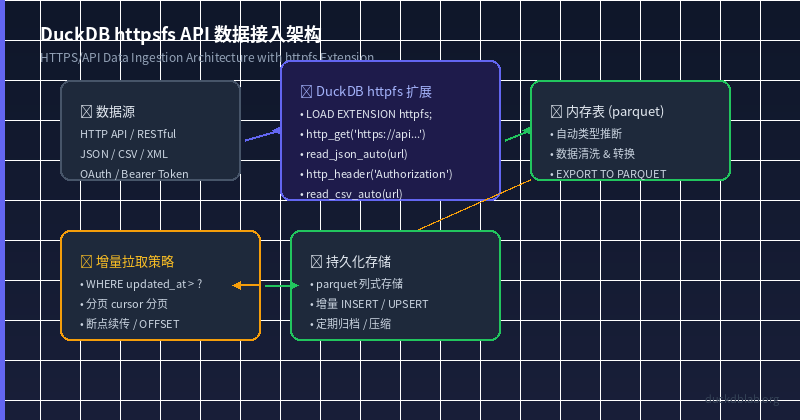
Fig: DuckDB httpfs API data ingestion architecture
In daily data analysis workflows, we often need to fetch data from external APIs — whether it’s a third-party RESTful API, an internal microservice endpoint, or a public data source (such as the GitHub API, weather APIs, and more). The traditional approach requires writing Python scripts using the requests library, saving data to local files, and then importing into a database. This multi-step, multi-tool process is error-prone and inefficient.
DuckDB’s httpfs extension lets you read remote HTTPS resources directly from SQL, reducing what used to be a multi-step data ingestion process into a single SQL statement. This article walks through a real-world scenario of an e-commerce sales data API ingestion, demonstrating DuckDB’s core capabilities in HTTPS/API data access.
Scenario: E-Commerce Platform Sales Data API Ingestion
Assume we have an e-commerce platform’s sales data API returning data in this format:
[
  {
    "order_id": "ORD-2026-0001",
    "customer_id": "CUST-1001",
    "product": "Mechanical Keyboard",
    "quantity": 2,
    "unit_price": 399.00,
    "total_amount": 798.00,
    "order_date": "2026-06-10T14:30:00Z",
    "status": "completed"
  },
  ...
]
We need to pull this API data into DuckDB for analysis and storage.
1. Loading the httpfs Extension and Reading Remote JSON
DuckDB’s httpfs extension provides the http_get() function and several remote data reading functions. Start by loading the extension:
LOAD httpfs;
1.1 Using read_json_auto to Read from a Remote URL Directly
CREATE TABLE api_data AS
SELECT * FROM read_json_auto(
  'https://jsonplaceholder.typicode.com/posts',
  columns={
    'userId': 'BIGINT',
    'id': 'BIGINT',
    'title': 'VARCHAR',
    'body': 'VARCHAR'
  }
);
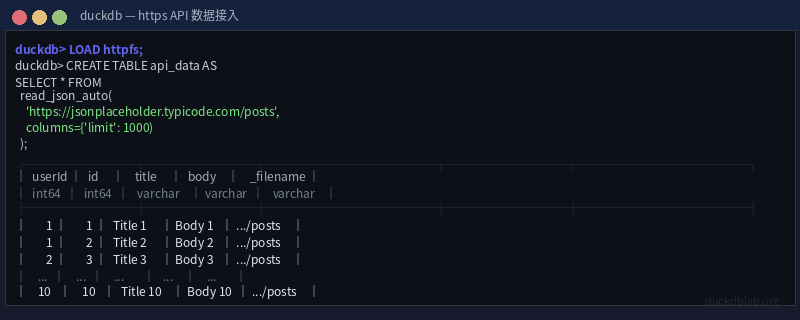
Fig: Terminal output reading JSON data from a remote API
read_json_auto automatically detects JSON format (array or newline-delimited JSON) and infers column types from the data. We can also explicitly specify the columns parameter to enforce type casting.
1.2 Using http_get for More Flexible Data Retrieval
For APIs requiring custom HTTP headers (such as OAuth authentication), use the http_get() function:
-- Set the user agent
SET http_user_agent = 'DuckDBDataPipeline/1.0';

-- Read from an authenticated API
CREATE TABLE protected_data AS
SELECT * FROM read_json_auto(
  http_get('https://api.example.com/v1/sales',
    headers={'Authorization': 'Bearer YOUR_TOKEN'}
  ),
  mode='raw',
  union_name_by_column=true
);
http_get() returns the response body as a BLOB, which can be parsed directly with read_json_auto(..., mode='raw').
2. Reading Remote CSV Data
Besides JSON, the httpfs extension also supports reading remote CSV files directly:
-- Read a remote CSV file
CREATE TABLE remote_csv AS
SELECT * FROM read_csv_auto(
  'https://raw.githubusercontent.com/plotly/datasets/master/equity_daily.csv',
  auto_detect=true,
  columns={
    'Date': 'DATE',
    'Open': 'DOUBLE',
    'High': 'DOUBLE',
    'Low': 'DOUBLE',
    'Close': 'DOUBLE',
    'Volume': 'BIGINT'
  }
);

-- Check the data schema
DESCRIBE remote_csv;

-- Query the closing prices for the last 7 days
SELECT Date, Close
FROM remote_csv
WHERE Date >= CURRENT_DATE - INTERVAL '7 days'
ORDER BY Date DESC;
The advantage of read_csv_auto is that it automatically detects delimiters, infers column types, and handles missing values. The columns parameter allows overriding auto-inferred types.
3. API Ingestion with Authentication and Retry
In production environments, APIs typically require authentication and may experience transient failures. Here is a complete ingestion template:
-- Configure global HTTP settings
SET http_user_agent = 'DuckDBDataPipeline/1.0';
SET http_timeout = 30000;  -- 5 minutes timeout

-- Using Bearer Token authentication
CREATE OR REPLACE VIEW api_sales_view AS
SELECT
  order_id,
  customer_id,
  product,
  quantity,
  unit_price,
  total_amount,
  CAST(order_date AS TIMESTAMP) AS order_time,
  status
FROM read_json_auto(
  http_get(
    'https://api.yourstore.com/v2/sales?limit=10000',
    headers={
      'Authorization': 'Bearer ' || {{env.DUCKDB_API_TOKEN}},
      'Content-Type': 'application/json'
    }
  ),
  mode='raw',
  union_name_by_column=true
);

-- Verify data integrity
SELECT
  COUNT(*) AS total_orders,
  COUNT(DISTINCT customer_id) AS unique_customers,
  SUM(total_amount) AS total_revenue,
  AVG(total_amount) AS avg_order_value
FROM api_sales_view;
Tip: In production, store API tokens in environment variables and reference them in SQL using the
{{env.VAR_NAME}}syntax to avoid hardcoding sensitive information.
4. Incremental Pull Strategies
Full pulls re-download all data every time, which is inefficient. Here are common incremental pull strategies:
4.1 Timestamp-Based Incremental Pull
-- Record the maximum timestamp from the last pull
CREATE TABLE IF NOT EXISTS sync_state (
  source VARCHAR PRIMARY KEY,
  last_sync_timestamp TIMESTAMP
);

-- Initialize on first run
INSERT INTO sync_state VALUES ('api_sales', '1970-01-01');

-- Incremental pull: fetch only new data since last sync
CREATE OR REPLACE TEMP TABLE new_records AS
SELECT * FROM read_json_auto(
  http_get(
    'https://api.yourstore.com/v2/sales?updated_after=2026-06-11T00:00:00Z&limit=5000',
    headers={'Authorization': 'Bearer ' || {{env.DUCKDB_API_TOKEN}}}
  ),
  mode='raw'
);

-- Merge new data into the main table (UPSERT semantics)
MERGE INTO sales_data target
USING new_records source
ON target.order_id = source.order_id
WHEN MATCHED THEN
  UPDATE SET quantity = source.quantity,
             total_amount = source.total_amount,
             updated_at = CURRENT_TIMESTAMP
WHEN NOT MATCHED THEN
  INSERT VALUES (source.*);

-- Update the sync state
UPDATE sync_state
SET last_sync_timestamp = (SELECT MAX(order_date) FROM new_records)
WHERE source = 'api_sales';
4.2 Cursor-Based Pagination
For APIs that don’t support updated_after, use cursor-based pagination:
-- Paginate through all data
CREATE OR REPLACE TEMP TABLE all_pages AS
SELECT * FROM (
  SELECT * FROM read_json_auto(
    'https://api.yourstore.com/v2/sales?page=1&per_page=100',
    union_name_by_column=true
  )
  UNION ALL
  SELECT * FROM read_json_auto(
    'https://api.yourstore.com/v2/sales?page=2&per_page=100',
    union_name_by_column=true
  )
  UNION ALL
  SELECT * FROM read_json_auto(
    'https://api.yourstore.com/v2/sales?page=3&per_page=100',
    union_name_by_column=true
  )
);

-- Or use a Python script to dynamically build pagination queries
4.3 Resume from Breakpoint
Combine sync_state table with OFFSET for resumable pulls:
-- Continue pulling from the last interrupted position
CREATE OR REPLACE TEMP TABLE resumed_pull AS
SELECT * FROM read_json_auto(
  http_get(
    'https://api.yourstore.com/v2/sales?limit=1000&offset=5000',
    headers={'Authorization': 'Bearer ' || {{env.DUCKDB_API_TOKEN}}}
  ),
  mode='raw'
);
5. Performance Optimization Tips
5.1 Parallel Pulling
-- Set thread count for better concurrency
SET threads = 4;

-- Read multiple API endpoints in parallel
CREATE TABLE combined_data AS
SELECT * FROM (
  SELECT * FROM read_json_auto(
    'https://api.store.com/v2/orders',
    union_name_by_column=true
  )
  UNION ALL
  SELECT * FROM read_json_auto(
    'https://api.store.com/v2/products',
    union_name_by_column=true
  )
  UNION ALL
  SELECT * FROM read_json_auto(
    'https://api.store.com/v2/customers',
    union_name_by_column=true
  )
);
5.2 Caching Mechanism
For infrequently changing API data, cache locally to Parquet files:
-- First pull and save as Parquet
COPY (
  SELECT * FROM read_json_auto(
    'https://api.example.com/data',
    union_name_by_column=true
  )
) TO '/data/cache/api_data.parquet' (FORMAT PARQUET);

-- Subsequent reads from local Parquet (10-100x faster)
SELECT * FROM read_parquet('/data/cache/api_data.parquet');
5.3 Filter Pushdown
Filter at read time to reduce network transfer:
-- Filter at the API level (if the API supports it)
CREATE TABLE filtered_data AS
SELECT * FROM read_json_auto(
  'https://api.yourstore.com/v2/sales?status=completed&limit=10000',
  union_name_by_column=true
);

-- Or filter within DuckDB
CREATE TABLE completed_orders AS
SELECT * FROM api_sales_view
WHERE status = 'completed'
  AND total_amount > 100;
6. Complete ETL Pipeline Example
Here is a complete pipeline from API pull, cleaning, to Parquet persistence:
-- 1. Load extension
LOAD httpfs;

-- 2. Create the target table
CREATE TABLE IF NOT EXISTS sales_pipeline (
  order_id VARCHAR PRIMARY KEY,
  customer_id VARCHAR,
  product VARCHAR,
  quantity INTEGER,
  unit_price DOUBLE,
  total_amount DOUBLE,
  order_time TIMESTAMP,
  status VARCHAR,
  synced_at TIMESTAMP DEFAULT CURRENT_TIMESTAMP
);

-- 3. Pull from API and clean
INSERT INTO sales_pipeline (
  order_id, customer_id, product, quantity, unit_price,
  total_amount, order_time, status
)
SELECT
  order_id,
  customer_id,
  TRIM(product) AS product,
  CAST(quantity AS INTEGER) AS quantity,
  ROUND(unit_price, 2) AS unit_price,
  ROUND(total_amount, 2) AS total_amount,
  CAST(order_date AS TIMESTAMP) AS order_time,
  LOWER(status) AS status
FROM read_json_auto(
  http_get(
    'https://api.yourstore.com/v2/sales?limit=10000',
    headers={'Authorization': 'Bearer ' || {{env.DUCKDB_API_TOKEN}}}
  ),
  mode='raw',
  union_name_by_column=true
)
WHERE total_amount > 0;

-- 4. Export to Parquet for BI tools
COPY sales_pipeline TO '/data/pipeline/sales_latest.parquet' (FORMAT PARQUET);

-- 5. Verify data
SELECT
  DATE(order_time) AS sale_date,
  COUNT(*) AS orders,
  SUM(total_amount) AS revenue,
  ROUND(AVG(total_amount), 2) AS avg_order
FROM sales_pipeline
WHERE order_time >= CURRENT_DATE - INTERVAL '30 days'
GROUP BY DATE(order_time)
ORDER BY sale_date;
Summary
With DuckDB’s httpfs extension, you can:
- Zero middleware: Read remote JSON/CSV directly from SQL, without Python scripts as intermediaries
- Flexible authentication: Support OAuth, Bearer Token, and more via
http_get() - Incremental pulls: Efficient incremental sync based on timestamps, cursors, or OFFSET
- Performance tuning: Parallel pulling, local caching, filter pushdown, and more
- Complete pipelines: From API pull, cleaning, transformation to Parquet persistence — all within DuckDB
This approach is especially well-suited for small-to-medium data pipeline scenarios, significantly reducing data engineering complexity.
More DuckDB in Action tips, follow Olap Studio (duckdblab.org)