Introduction
Fig: DuckDB httpfs production pipeline architecture — from authentication to incremental sync
In our previous article, we introduced the basics of DuckDB’s httpfs extension for reading remote JSON and CSV files directly. But in real production environments, API data ingestion is far more complex than a single SQL query. You’ll typically face these challenges:
- API Authentication: Bearer Token, API Key, OAuth 2.0
- Pagination: APIs return large datasets split across pages
- Streaming large JSON: Handling responses too large for memory
- Incremental sync: Only fetching changed data since last sync
- Error handling: Network failures, rate limiting (429)
This article walks through a complete e-commerce order API integration scenario, systematically solving each challenge to build a production-grade DuckDB httpfs pipeline.
1. Environment Setup & Extension Loading
Ensure DuckDB >= 1.0.0, then load the httpfs extension:
INSTALL httpfs;
LOAD httpfs;

-- Verify extension is loaded
SELECT name, version FROM installed_extensions WHERE name = 'httpfs';
Also configure timeout and concurrency settings for production:
-- Set HTTP timeout (seconds)
SET http_timeout = 30;

-- Set max concurrent connections
SET http_max_connections = 10;

-- Verify settings
PRAGMA http_timeout;
PRAGMA http_max_connections;
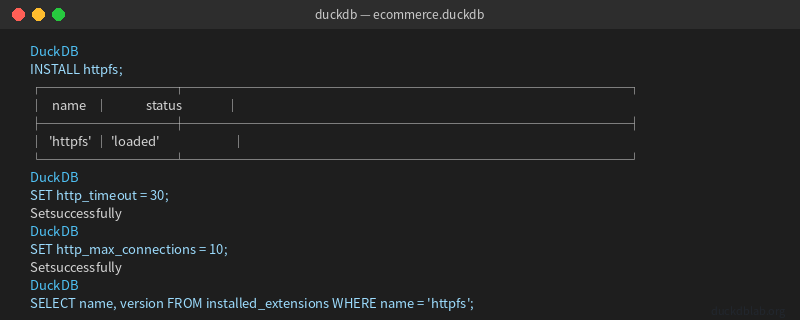
Fig: Loading httpfs extension and configuring production parameters
2. API Authentication: Bearer Token & Custom Headers
Most production APIs require authentication. DuckDB httpfs supports custom HTTP headers via the headers parameter.
2.1 Bearer Token Authentication
-- Method 1: Pass headers inline
SELECT * FROM read_json_auto(
    'https://api.example.com/v2/orders',
    headers => {'Authorization': 'Bearer eyJhbGciOiJIUzI1NiIsInR5cCI6IkpXVCJ9...'}
);

-- Method 2: Store credentials in DuckDB (avoid hardcoding)
CREATE CREDENTIAL duckdb_api_creds (
    'Authorization' VALUE 'Bearer eyJhbGciOiJIUzI1NiIsInR5cCI6IkpXVCJ9...'
);

-- Use credentials
SELECT * FROM read_json_auto(
    'https://api.example.com/v2/orders',
    credential => 'duckdb_api_creds'
);
2.2 API Key Authentication
-- API Key as Header
SELECT * FROM read_csv_auto(
    'https://api.example.com/v1/products',
    headers => {'X-API-Key': 'pk_live_abc123xyz'}
);

-- API Key as query parameter
SELECT * FROM read_json_auto(
    'https://api.example.com/v1/products?api_key=pk_live_abc123xyz'
);
2.3 Basic Authentication
SELECT * FROM read_json_auto(
    'https://api.example.com/v1/secure-data',
    headers => {
        'Authorization': 'Basic ' || encode(base64('username:password'), 'UTF8')
    }
);
Security tip: Use DuckDB’s Credential system or environment variables in production — never hardcode tokens in SQL.
3. Pagination: From Single Page to Full Dataset
When APIs return large datasets, they typically use pagination. DuckDB can handle this via loops and merging.
3.1 Understanding Pagination Parameters
Typical paginated API:
GET https://api.example.com/v2/orders?page=1&limit=100
GET https://api.example.com/v2/orders?page=2&limit=100
GET https://api.example.com/v2/orders?page=3&limit=100
...
3.2 Python Loop for Full Data Extraction
While DuckDB SQL doesn’t support loops natively, we can combine Python with DuckDB:
import duckdb
import requests
import json

DB_PATH = "ecommerce.duckdb"
API_BASE = "https://api.example.com/v2"
TOKEN = "Bearer your_token_here"
PAGE_SIZE = 100

con = duckdb.connect(DB_PATH)
con.execute("INSTALL httpfs; LOAD httpfs;")

all_orders = []
page = 1

while True:
    resp = requests.get(
        f"{API_BASE}/orders",
        params={"page": page, "limit": PAGE_SIZE},
        headers={"Authorization": TOKEN}
    )
    data = resp.json()

    if not data.get("items"):
        break

    all_orders.extend(data["items"])
    total = data.get("total", 0)
    print(f"Page {page}: got {len(data['items'])} records, total so far: {len(all_orders)}")

    if len(all_orders) >= total:
        break
    page += 1

# Write to DuckDB
con.execute("CREATE TABLE IF NOT EXISTS orders (order_id VARCHAR, customer_id VARCHAR, product VARCHAR, quantity INTEGER, amount DECIMAL, order_date TIMESTAMP, status VARCHAR)")
con.execute("DELETE FROM orders")
# ... insert all_orders ...

print(f"Total records loaded: {len(all_orders)}")
con.close()
3.3 Recursive CTE for Nested Pagination
For APIs with pagination info in the response, use DuckDB’s recursive CTE:
-- Load first page
CREATE TABLE api_page_1 AS
SELECT * FROM read_json_auto(
    'https://api.example.com/v2/orders?page=1&limit=100',
    headers => {'Authorization': 'Bearer your_token'}
);

-- Recursive pagination (DuckDB 1.1+)
WITH RECURSIVE fetched_pages AS (
    SELECT 1 AS page_num, * FROM api_page_1
    UNION ALL
    SELECT fp.page_num + 1,
           * FROM read_json_auto(
               'https://api.example.com/v2/orders?page=' || (fp.page_num + 1) || '&limit=100',
               headers => {'Authorization': 'Bearer your_token'}
           ) AS t
    WHERE fp.page_num < 5
)
SELECT * FROM fetched_pages;
Note: Recursive CTE works for small page counts. For large datasets, prefer the Python loop approach.
4. Streaming Large JSON Responses
When API responses are very large (hundreds of MB or GB), direct read_json_auto may cause OOM. DuckDB provides streaming capabilities.
4.1 Using the streaming Option
-- Stream large JSON (DuckDB 1.0+)
CREATE TABLE large_orders AS
SELECT * FROM read_json_auto(
    'https://api.example.com/v2/orders?limit=50000',
    streaming => true,
    headers => {'Authorization': 'Bearer your_token'}
);
4.2 Chunked Processing with Incremental Writes
import duckdb
import requests

con = duckdb.connect("ecommerce.duckdb")
con.execute("INSTALL httpfs; LOAD httpfs;")

con.execute("""
    CREATE TABLE IF NOT EXISTS orders_batch (
        order_id VARCHAR,
        customer_id VARCHAR,
        product VARCHAR,
        quantity INTEGER,
        amount DECIMAL(10,2),
        order_date TIMESTAMP,
        status VARCHAR
    )
""")

batch_size = 10000
offset = 0

while True:
    resp = requests.get(
        "https://api.example.com/v2/orders",
        params={"limit": batch_size, "offset": offset},
        headers={"Authorization": "Bearer your_token"}
    )
    data = resp.json()

    if not data.get("items"):
        break

    df = con.sql(f"""
        SELECT * FROM read_json_auto(
            'https://api.example.com/v2/orders?limit={batch_size}&offset={offset}',
            streaming => true,
            headers => {{'Authorization': 'Bearer your_token'}}
        )
    """).fetchdf()

    con.execute("INSERT INTO orders_batch SELECT * FROM df")
    print(f"Batch {offset//batch_size + 1}: inserted {len(df)} rows")

    offset += batch_size
    if len(df) < batch_size:
        break

result = con.execute("SELECT COUNT(*) FROM orders_batch").fetchone()
print(f"Total: {result[0]} records")
con.close()
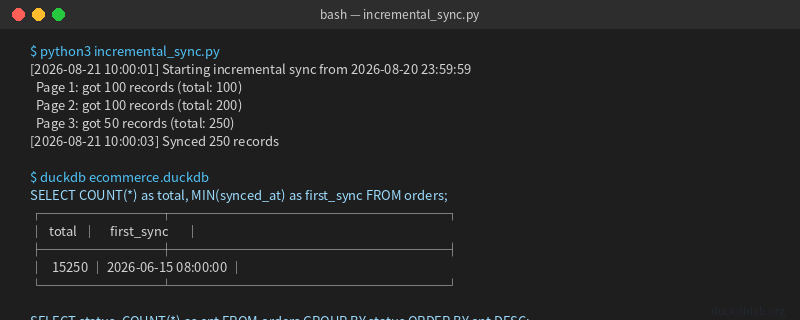
Fig: Streaming large JSON and writing in batches to DuckDB
5. Timestamp-Based Incremental Sync
Full syncs are inefficient and wasteful. Production environments typically use incremental sync — only fetching data changed since the last sync.
5.1 Incremental Sync Logic
1. Record the last sync timestamp
2. Query API for data where updatedAt > last_sync
3. UPSERT into local table
4. Update sync timestamp
5.2 Implementing Incremental Sync
-- Create sync state table
CREATE TABLE IF NOT EXISTS sync_state (
    source VARCHAR PRIMARY KEY,
    last_synced_at TIMESTAMP
);

-- Initialize sync state
INSERT INTO sync_state (source, last_synced_at)
VALUES ('orders_api', '2026-01-01 00:00:00')
ON CONFLICT (source) DO NOTHING;

-- Target table with UPSERT support
CREATE TABLE IF NOT EXISTS orders_incremental (
    order_id VARCHAR PRIMARY KEY,
    customer_id VARCHAR,
    product VARCHAR,
    quantity INTEGER,
    amount DECIMAL(10,2),
    order_date TIMESTAMP,
    status VARCHAR,
    updated_at TIMESTAMP,
    synced_at TIMESTAMP DEFAULT CURRENT_TIMESTAMP
);
import duckdb
from datetime import datetime

con = duckdb.connect("ecommerce.duckdb")
con.execute("INSTALL httpfs; LOAD httpfs;")

# Read last sync time
last_sync = con.execute(
    "SELECT last_synced_at FROM sync_state WHERE source = 'orders_api'"
).fetchone()[0]
print(f"Last sync: {last_sync}")

# Fetch incremental data (assuming API supports ?since=)
new_data = con.execute(f"""
    SELECT * FROM read_json_auto(
        'https://api.example.com/v2/orders?since={last_sync}',
        headers => {{'Authorization': 'Bearer your_token'}}
    )
""").fetchdf()

print(f"New records: {len(new_data)}")

# UPSERT merge
if len(new_data) > 0:
    con.execute("CREATE TEMP TABLE new_batch AS SELECT * FROM new_data")
    con.execute("""
        INSERT INTO orders_incremental
        SELECT * FROM new_batch
        ON CONFLICT (order_id) DO UPDATE SET
            customer_id = EXCLUDED.customer_id,
            product = EXCLUDED.product,
            quantity = EXCLUDED.quantity,
            amount = EXCLUDED.amount,
            order_date = EXCLUDED.order_date,
            status = EXCLUDED.status,
            updated_at = EXCLUDED.updated_at,
            synced_at = CURRENT_TIMESTAMP
    """)

# Update sync time
new_sync_time = con.execute(
    "SELECT MAX(updated_at) FROM new_batch"
).fetchone()[0]
con.execute(f"""
    UPDATE sync_state
    SET last_synced_at = '{new_sync_time}'
    WHERE source = 'orders_api'
""")

con.close()
5.3 Scheduled Incremental Sync Script
#!/usr/bin/env python3
"""DuckDB Incremental Sync Scheduler"""
import duckdb
import schedule
import time
from datetime import datetime

def sync_orders():
    con = duckdb.connect("ecommerce.duckdb")
    con.execute("INSTALL httpfs; LOAD httpfs;")

    last_sync = con.execute(
        "SELECT last_synced_at FROM sync_state WHERE source = 'orders_api'"
    ).fetchone()[0]

    df = con.execute(f"""
        SELECT * FROM read_json_auto(
            'https://api.example.com/v2/orders?since={last_sync}',
            headers => {{'Authorization': 'Bearer your_token'}}
        )
    """).fetchdf()

    if len(df) > 0:
        con.execute("CREATE TEMP TABLE batch AS SELECT * FROM df")
        con.execute("""
            INSERT INTO orders_incremental
            SELECT * FROM batch
            ON CONFLICT (order_id) DO UPDATE SET
                status = EXCLUDED.status,
                updated_at = EXCLUDED.updated_at,
                synced_at = CURRENT_TIMESTAMP
        """)
        new_time = df['updated_at'].max()
        con.execute(f"UPDATE sync_state SET last_synced_at = '{new_time}' WHERE source = 'orders_api'")
        print(f"[{datetime.now()}] Synced {len(df)} new records")

    con.close()

# Run every 5 minutes
schedule.every(5).minutes.do(sync_orders)

while True:
    schedule.run_pending()
    time.sleep(1)
6. Error Handling & Retry Mechanisms
Production environments must handle network failures and rate limiting.
6.1 Built-in Retry (DuckDB 1.1+)
SELECT * FROM read_json_auto(
    'https://api.example.com/v2/orders',
    headers => {'Authorization': 'Bearer your_token'},
    retry => true,
    retry_max => 3,
    retry_delay_ms => 1000
);
6.2 Python-side Retry (More Flexible)
import requests
from requests.adapters import HTTPAdapter
from urllib3.util.retry import Retry

session = requests.Session()
retry = Retry(
    total=3,
    backoff_factor=1,
    status_forcelist=[429, 500, 502, 503, 504]
)
adapter = HTTPAdapter(max_retries=retry)
session.mount('https://', adapter)

resp = session.get(
    'https://api.example.com/v2/orders',
    headers={'Authorization': 'Bearer your_token'},
    params={'page': 1, 'limit': 100}
)
6.3 Rate Limit Handling
import time

def fetch_with_rate_limit(url, headers, max_retries=5):
    for attempt in range(max_retries):
        resp = requests.get(url, headers=headers)

        if resp.status_code == 200:
            return resp.json()
        elif resp.status_code == 429:
            retry_after = int(resp.headers.get('Retry-After', 2 ** attempt))
            print(f"Rate limited. Waiting {retry_after}s...")
            time.sleep(retry_after)
        else:
            raise Exception(f"HTTP {resp.status_code}")

    raise Exception(f"Failed after {max_retries} retries")
7. Complete Production Pipeline Example
Integrating all techniques into a production-grade data pipeline:
#!/usr/bin/env python3
"""
DuckDB Production API Data Pipeline
Features: Auth + Pagination + Incremental + Retry + UPSERT
"""
import duckdb
import requests
import json
import time
from datetime import datetime
from requests.adapters import HTTPAdapter
from urllib3.util.retry import Retry

class DuckDBAPIPipeline:
    def __init__(self, db_path, api_base, token):
        self.db_path = db_path
        self.api_base = api_base
        self.token = token
        self.con = duckdb.connect(db_path)
        self._setup()

        self.session = requests.Session()
        retry = Retry(total=3, backoff_factor=1,
                      status_forcelist=[429, 500, 502, 503, 504])
        self.session.mount('https://', HTTPAdapter(max_retries=retry))

    def _setup(self):
        self.con.execute("INSTALL httpfs; LOAD httpfs;")

        self.con.execute("""
            CREATE TABLE IF NOT EXISTS orders (
                order_id VARCHAR PRIMARY KEY,
                customer_id VARCHAR,
                product VARCHAR,
                quantity INTEGER,
                amount DECIMAL(10,2),
                order_date TIMESTAMP,
                status VARCHAR,
                updated_at TIMESTAMP,
                synced_at TIMESTAMP DEFAULT CURRENT_TIMESTAMP
            )
        """)

        self.con.execute("""
            CREATE TABLE IF NOT EXISTS sync_state (
                source VARCHAR PRIMARY KEY,
                last_synced_at TIMESTAMP,
                last_sync_status VARCHAR,
                record_count INTEGER
            )
        """)

    def incremental_sync(self):
        row = self.con.execute(
            "SELECT last_synced_at FROM sync_state WHERE source = 'orders'"
        ).fetchone()

        last_sync = row[0] if row else "2026-01-01 00:00:00"
        print(f"[{datetime.now()}] Starting incremental sync from {last_sync}")

        all_records = []
        page = 1
        page_size = 100

        while True:
            resp = self.session.get(
                f"{self.api_base}/orders",
                params={"page": page, "limit": page_size, "since": last_sync},
                headers={"Authorization": self.token}
            )

            if resp.status_code == 429:
                wait = int(resp.headers.get('Retry-After', 5))
                print(f"  Rate limited, waiting {wait}s...")
                time.sleep(wait)
                continue

            data = resp.json()
            items = data.get("items", [])

            if not items:
                break

            all_records.extend(items)
            print(f"  Page {page}: got {len(items)} records (total: {len(all_records)})")

            if len(all_records) >= data.get("total", 0):
                break
            page += 1

        if all_records:
            self.con.execute("CREATE TEMP TABLE batch AS SELECT * FROM (VALUES " +
                ",".join([f"({json.dumps(r['order_id'])}, {json.dumps(r['customer_id'])}, "
                         f"{json.dumps(r['product'])}, {r['quantity']}, {r['amount']}, "
                         f"{json.dumps(r['order_date'])}, {json.dumps(r['status'])}, "
                         f"{json.dumps(r.get('updated_at', r['order_date']))})"
                         for r in all_records[:500]]) + "))")

            self.con.execute("""
                INSERT INTO orders
                SELECT * FROM batch
                ON CONFLICT (order_id) DO UPDATE SET
                    customer_id = EXCLUDED.customer_id,
                    product = EXCLUDED.product,
                    quantity = EXCLUDED.quantity,
                    amount = EXCLUDED.amount,
                    status = EXCLUDED.status,
                    updated_at = EXCLUDED.updated_at,
                    synced_at = CURRENT_TIMESTAMP
            """)

            new_time = max(r.get('updated_at', r['order_date']) for r in all_records)
            self.con.execute("""
                INSERT INTO sync_state (source, last_synced_at, last_sync_status, record_count)
                VALUES ('orders', ?, 'success', ?)
                ON CONFLICT (source) DO UPDATE SET
                    last_synced_at = EXCLUDED.last_synced_at,
                    last_sync_status = EXCLUDED.last_sync_status,
                    record_count = EXCLUDED.record_count
            """, [new_time, len(all_records)])

            print(f"[{datetime.now()}] Synced {len(all_records)} records")
        else:
            print(f"[{datetime.now()}] No new records")

        return len(all_records)

    def close(self):
        self.con.close()

# Usage
if __name__ == "__main__":
    pipeline = DuckDBAPIPipeline(
        db_path="ecommerce.duckdb",
        api_base="https://api.example.com/v2",
        token="Bearer your_token_here"
    )

    try:
        count = pipeline.incremental_sync()
        stats = pipeline.con.execute(
            "SELECT COUNT(*) as total, MIN(synced_at) as first_sync FROM orders"
        ).fetchone()
        print(f"Database stats: total={stats[0]}, first_sync={stats[1]}")
    finally:
        pipeline.close()
8. Performance Optimization Checklist
| Optimization | Config | Description |
|---|---|---|
| Streaming read | streaming => true | Prevent OOM with large JSON |
| Connection pool | http_max_connections | Improve concurrent fetch efficiency |
| Timeout | http_timeout | Prevent long blocking |
| Page size | limit=100~500 | Balance memory vs. request count |
| Incremental strategy | since parameter | Avoid full re-sync |
| Auto retry | retry => true | Improve network stability |
Summary
This article systematically covered advanced production usage of DuckDB’s httpfs extension:
- API Authentication: Bearer Token, API Key, Basic Auth implementations
- Pagination: Python loop + DuckDB recursive CTE approaches
- Streaming:
streamingoption and chunked writing for large JSON - Incremental sync: Timestamp-based UPSERT pattern to avoid full re-syncs
- Error handling: Auto-retry, rate limit backoff, timeout control
- Complete pipeline: Production-grade Python script integrating all techniques
With these patterns, you can build efficient, stable, automated DuckDB data pipelines for zero-intermediary API-to-analysis workflows.
For more DuckDB in-action tips, follow DuckDB Lab (duckdblab.org).
本文信息
| 项目 | 内容 |
|---|---|
| DuckDB 版本 | v1.5.x(部分功能基于 v2.0 Preview) |
| 最后验证 | 2026-09-12 |
| 测试环境 | Linux / x86_64 / 16GB RAM |
| 官方文档 | DuckDB Documentation |
| GitHub | pengzz9527/duckdb-blog |
如发现错误,欢迎通过 GitHub Issue 或邮件 [email protected] 反馈。