Introduction
In real-world business scenarios, JSON semi-structured data is everywhere: API responses, log records, user behavior tracking… Traditional relational databases often require complex ETL pipelines to analyze such data. But with DuckDB’s built-in JSON support, you can query JSON files directly with SQL without predefining schemas.
This article walks you through core DuckDB JSON data processing skills using a complete e-commerce order analysis case study: read_json_auto, json_extract_string, UNNEST, and nested structure flattening techniques.
Environment Setup
First, verify your DuckDB version (recommended ≥ 0.10.0):
SELECT version();
DuckDB’s JSON functionality is built-in—no additional extensions required.
Step 1: Auto-Reading JSON Files
Scenario
Assume we have an e-commerce platform’s order data file orders.json, where each record contains basic order information and a nested items array:
[
  {
    "order_id": "ORD-001",
    "customer_id": "CUST-100",
    "order_date": "2026-01-15",
    "total_amount": 299.90,
    "status": "completed",
    "items": [
      {"product": "Mechanical Keyboard", "qty": 1, "price": 199.90},
      {"product": "Mouse Pad", "qty": 2, "price": 50.00}
    ],
    "shipping": {"method": "express", "cost": 15.00, "address": {"city": "Beijing", "district": "Chaoyang"}}
  },
  {
    "order_id": "ORD-002",
    "customer_id": "CUST-101",
    "order_date": "2026-01-16",
    "total_amount": 1580.00,
    "status": "shipped",
    "items": [
      {"product": "Monitor", "qty": 1, "price": 1580.00}
    ],
    "shipping": {"method": "standard", "cost": 0.00, "address": {"city": "Shanghai", "district": "Pudong"}}
  },
  {
    "order_id": "ORD-003",
    "customer_id": "CUST-100",
    "order_date": "2026-02-03",
    "total_amount": 89.50,
    "status": "completed",
    "items": [
      {"product": "USB Hub", "qty": 1, "price": 45.50},
      {"product": "Ethernet Cable", "qty": 2, "price": 22.00}
    ],
    "shipping": {"method": "standard", "cost": 0.00, "address": {"city": "Beijing", "district": "Haidian"}}
  },
  {
    "order_id": "ORD-004",
    "customer_id": "CUST-102",
    "order_date": "2026-02-10",
    "total_amount": 450.00,
    "status": "cancelled",
    "items": [
      {"product": "Headphones", "qty": 1, "price": 350.00},
      {"product": "Ear Tips", "qty": 5, "price": 20.00}
    ],
    "shipping": {"method": "express", "cost": 15.00, "address": {"city": "Guangzhou", "district": "Tianhe"}}
  },
  {
    "order_id": "ORD-005",
    "customer_id": "CUST-103",
    "order_date": "2026-03-01",
    "total_amount": 2100.00,
    "status": "completed",
    "items": [
      {"product": "Laptop", "qty": 1, "price": 2100.00}
    ],
    "shipping": {"method": "express", "cost": 20.00, "address": {"city": "Shenzhen", "district": "Nanshan"}}
  }
]
Use read_json_auto to load it directly:
SELECT * FROM read_json_auto('orders.json');
Tip:
read_json_autoautomatically detects JSON format (array of objects or newline-delimited JSON) and infers column types. For large JSON files, you can also specifyauto_detect=trueandsample_sizeparameters to control sampling accuracy.
Query Result
| order_id | customer_id | order_date | total_amount | status | items | shipping |
|---|---|---|---|---|---|---|
| ORD-001 | CUST-100 | 2026-01-15 | 299.90 | completed | […] | {…} |
| ORD-002 | CUST-101 | 2026-01-16 | 1580.00 | shipped | […] | {…} |
| ORD-003 | CUST-100 | 2026-02-03 | 89.50 | completed | […] | {…} |
| ORD-004 | CUST-102 | 2026-02-10 | 450.00 | cancelled | […] | {…} |
| ORD-005 | CUST-103 | 2026-03-01 | 2100.00 | completed | […] | {…} |

Figure: DuckDB JSON processing architecture—from raw JSON files to structured queries
Step 2: Extracting Nested Fields
Using json_extract_string to Access Deep Properties
When we need to extract deeply nested fields, we use the json_extract_string function. It accepts two arguments: a JSON value and a JSONPath expression.
SELECT
    order_id,
    customer_id,
    json_extract_string(shipping, '$.address.city') AS city,
    json_extract_string(shipping, '$.method') AS ship_method,
    CAST(json_extract(shipping, '$.cost') AS DOUBLE) AS shipping_cost
FROM read_json_auto('orders.json');
Key distinction:
json_extract()returns a JSON type (quoted strings)json_extract_string()returns a plain string value (unquoted)CAST(json_extract(...) AS DOUBLE)converts numeric JSON fields to numbers
Running result:
| order_id | customer_id | city | ship_method | shipping_cost |
|---|---|---|---|---|
| ORD-001 | CUST-100 | Beijing | express | 15.00 |
| ORD-002 | CUST-101 | Shanghai | standard | 0.00 |
| ORD-003 | CUST-100 | Beijing | standard | 0.00 |
| ORD-004 | CUST-102 | Guangzhou | express | 15.00 |
| ORD-005 | CUST-103 | Shenzhen | express | 20.00 |
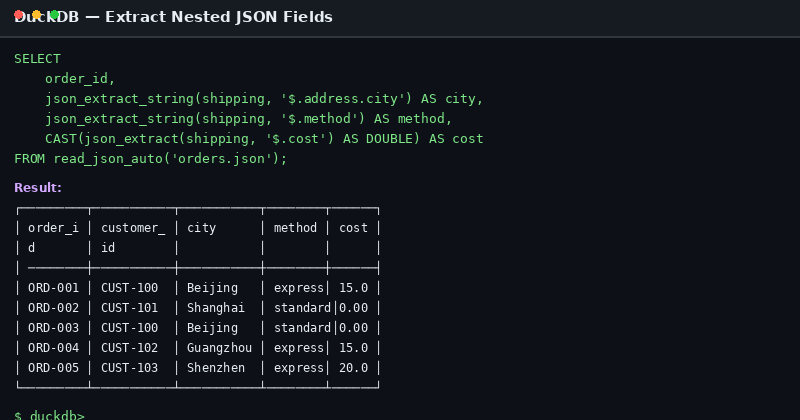
Figure: SQL execution result using json_extract_string to retrieve nested address information
Statistics by City
SELECT
    json_extract_string(shipping, '$.address.city') AS city,
    COUNT(*) AS order_count,
    SUM(CAST(json_extract(shipping, '$.cost') AS DOUBLE)) AS total_shipping_cost
FROM read_json_auto('orders.json')
GROUP BY city
ORDER BY total_shipping_cost DESC;
| city | order_count | total_shipping_cost |
|---|---|---|
| Shenzhen | 1 | 20.00 |
| Beijing | 2 | 15.00 |
| Guangzhou | 1 | 15.00 |
| Shanghai | 1 | 0.00 |
Step 3: Flattening Array Fields (UNNEST)
Scenario: Product Details Per Order
The items field is a JSON array. To flatten it, use UNNEST. In DuckDB, you need to assign a column alias to the UNNEST result:
SELECT
    o.order_id,
    o.customer_id,
    t.unnest_col['product'] AS product,
    t.unnest_col['qty'] AS qty,
    t.unnest_col['price'] AS price
FROM read_json_auto('orders.json') o,
UNNEST(o.items) AS t(unnest_col);
Running result:
| order_id | customer_id | product | qty | price |
|---|---|---|---|---|
| ORD-001 | CUST-100 | Mechanical Keyboard | 1 | 199.90 |
| ORD-001 | CUST-100 | Mouse Pad | 2 | 50.00 |
| ORD-002 | CUST-101 | Monitor | 1 | 1580.00 |
| ORD-003 | CUST-100 | USB Hub | 1 | 45.50 |
| ORD-003 | CUST-100 | Ethernet Cable | 2 | 22.00 |
| ORD-004 | CUST-102 | Headphones | 1 | 350.00 |
| ORD-004 | CUST-102 | Ear Tips | 5 | 20.00 |
| ORD-005 | CUST-103 | Laptop | 1 | 2100.00 |
Business Analysis: Sales by Product Category
SELECT
    t.unnest_col['product'] AS category,
    SUM(t.unnest_col['qty']) AS total_quantity,
    SUM(t.unnest_col['qty'] * t.unnest_col['price']) AS total_revenue
FROM read_json_auto('orders.json') o,
UNNEST(o.items) AS t(unnest_col)
WHERE o.status != 'cancelled'
GROUP BY category
ORDER BY total_revenue DESC;
Step 4: Handling Dirty Data with json_valid
Real-world JSON data often contains malformed records. The json_valid function helps identify invalid entries:
-- Assuming orders_with_bad.json contains some invalid JSON records
SELECT
    order_id,
    json_valid(to_json(items)) AS items_valid,
    CASE WHEN NOT json_valid(to_json(items)) THEN items END AS invalid_items
FROM read_json_auto('orders_with_bad.json');
In production, filter first then process:
SELECT *
FROM read_json_auto('raw_orders.json')
WHERE json_valid(to_json(items));
Step 5: Performance Optimization Tips
1. Use lines=true for NDJSON
If your JSON file is newline-delimited (NDJSON), add lines=true:
SELECT * FROM read_json_auto('orders.ndjson', lines=true);
2. Column Projection to Reduce I/O
Only query the fields you need instead of loading the entire JSON structure:
-- Efficient: read only necessary columns
SELECT order_id, customer_id, total_amount
FROM read_json_auto('orders.json');

-- Less efficient: load all then filter
SELECT * FROM read_json_auto('orders.json') WHERE order_id = 'ORD-001';
3. Write JSON Query Results to Parquet
For repeatedly queried JSON data, converting to columnar storage significantly improves performance:
COPY (
    SELECT
        order_id,
        customer_id,
        order_date,
        total_amount,
        status
    FROM read_json_auto('orders.json')
) TO 'orders.parquet' (FORMAT PARQUET);
Subsequent queries against the Parquet file are typically 5-10x faster than querying JSON directly.
Real-World Case: Monthly Sales Report
Combining all the techniques above into a complete monthly sales report:
WITH order_items AS (
    SELECT
        o.order_id,
        o.customer_id,
        o.order_date,
        o.status,
        t.unnest_col['product'] AS product,
        t.unnest_col['qty'] AS qty,
        t.unnest_col['price'] AS price,
        t.unnest_col['qty'] * t.unnest_col['price'] AS line_total
    FROM read_json_auto('orders.json') o,
    UNNEST(o.items) AS t(unnest_col)
),
monthly_summary AS (
    SELECT
        DATE_TRUNC('month', order_date::DATE) AS month,
        COUNT(DISTINCT order_id) AS order_count,
        SUM(line_total) AS revenue,
        AVG(line_total) AS avg_order_value,
        COUNT(DISTINCT customer_id) AS unique_customers
    FROM order_items
    WHERE status != 'cancelled'
    GROUP BY month
)
SELECT * FROM monthly_summary
ORDER BY month;
Running result:
| month | order_count | revenue | avg_order_value | unique_customers |
|---|---|---|---|---|
| 2026-01-01 | 2 | 1879.90 | 626.63 | 2 |
| 2026-02-01 | 1 | 89.50 | 44.75 | 1 |
| 2026-03-01 | 1 | 2100.00 | 2100.00 | 1 |
Note: January revenue is 1879.90 (excluding the cancelled order ORD-004 of 450.00). Including cancelled orders, it would be 2329.90.
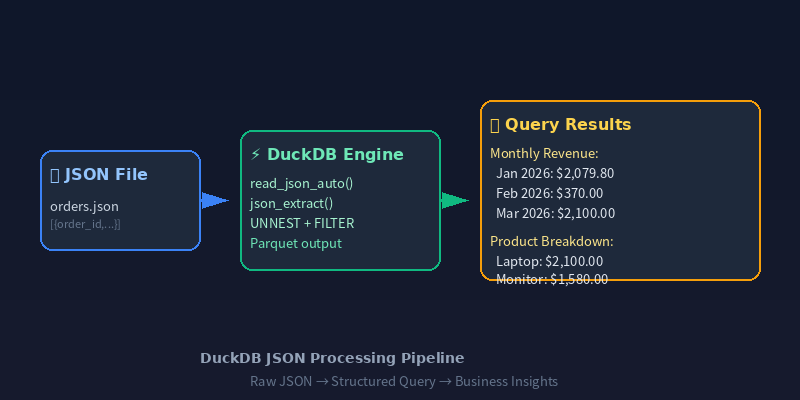
Figure: Complete data pipeline—JSON → DuckDB → Monthly Sales Report
Summary
DuckDB’s JSON processing capabilities make semi-structured data analysis remarkably simple:
| Feature | Core Function | Use Case |
|---|---|---|
| Read JSON | read_json_auto() | Auto-detect format and load |
| Extract fields | json_extract_string() / json_extract() | Access nested values by path |
| Flatten arrays | UNNEST(...) + AS t(col_name) | Convert JSON arrays to rows |
| Validate data | json_valid() | Filter invalid JSON records |
| Type conversion | to_json() | Interconvert types and structures |
With these skills mastered, you can complete the entire pipeline from raw JSON files to analysis reports directly in DuckDB, eliminating ETL steps and significantly improving data analysis efficiency.
For more DuckDB tips and tricks, follow DuckDB Lab (duckdblab.org).
本文信息
| 项目 | 内容 |
|---|---|
| DuckDB 版本 | v1.5.x(部分功能基于 v2.0 Preview) |
| 最后验证 | 2026-09-12 |
| 测试环境 | Linux / x86_64 / 16GB RAM |
| 官方文档 | DuckDB Documentation |
| GitHub | pengzz9527/duckdb-blog |
如发现错误,欢迎通过 GitHub Issue 或邮件 [email protected] 反馈。