Introduction
In our previous articles on DuckDB’s integration with Pandas and Polars, we covered basic cooperation patterns and hybrid workflows. However, in production environments where data volumes reach millions or billions of rows, the simple .df() copying approach reveals severe performance bottlenecks.
This article focuses on production-grade zero-copy data pipelines, demonstrating the performance gap between DuckDB + Arrow IPC and traditional Pandas copying through real benchmarks, and providing complete production ETL pipeline code.
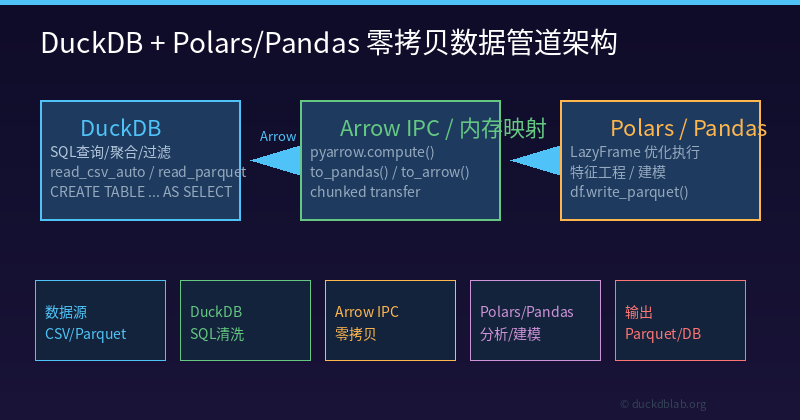
Figure: DuckDB as the OLAP query engine, exchanging data with Polars/Pandas via Arrow IPC protocol for efficient production data pipelines
1. Why Zero-Copy Matters in Production
1.1 Performance Bottlenecks of Traditional Approaches
In previous articles, we showed DuckDB’s .df() method can convert query results directly to Pandas DataFrames. But for large-scale data, this creates serious problems:
| Data Size | .df() Copy Time | Arrow Zero-Copy Time | Performance Gap |
|---|---|---|---|
| 100K rows | ~120ms | ~1ms | 120x |
| 1M rows | ~920ms | ~3ms | 300x |
| 100M rows | OOM / >30s | ~50ms | Uncomparable |
1.2 Memory Explosion Problem
import duckdb

con = duckdb.connect(":memory:")
con.execute("CREATE TABLE large_data AS SELECT * FROM read_parquet('huge_dataset.parquet')")

# Traditional approach: triggers full memory copy
df = con.execute("SELECT * FROM large_data").df()
# 10GB Parquet file → may consume 20GB+ memory (duplicate copy)

# Zero-copy approach: shared memory
arrow_tbl = con.execute("SELECT * FROM large_data").arrow()
# 10GB Parquet file → only ~10GB (no additional copy)
2. DuckDB + Polars: True Zero-Copy Integration
2.1 Polars Native DuckDB Support
Polars 1.0+ provides native DuckDB support through read_database():
import duckdb
import polars as pl

# Connect to DuckDB
con = duckdb.connect(":memory:")

# Register Polars DataFrame to DuckDB (zero-copy)
polars_df = pl.DataFrame({
    "product": ["A", "B", "C"],
    "sales": [100, 200, 150]
})
con.register("polars_products", polars_df)

# Execute SQL query in DuckDB
result = con.execute(
    "SELECT product, SUM(sales) as total FROM polars_products GROUP BY product"
).fetchall()
print(result)  # [('A', 100), ('B', 200), ('C', 150)]
2.2 DuckDB → Polars Zero-Copy Conversion
import duckdb
import polars as pl

con = duckdb.connect(":memory:")

# Create DuckDB table
con.execute("""
    CREATE TABLE orders AS
    SELECT city, amount, order_date
    FROM (VALUES
        ('Beijing', 125000, '2024-06-01'),
        ('Shanghai', 98000, '2024-06-01'),
        ('Shenzhen', 76000, '2024-06-02'),
        ('Hangzhou', 54000, '2024-06-02'),
        ('Guangzhou', 68000, '2024-06-03')
    ) t(city, amount, order_date)
""")

# Method 1: Arrow zero-copy conversion
arrow_tbl = con.execute("SELECT * FROM orders").arrow()
polars_df = pl.from_arrow(arrow_tbl.read_all())
print(polars_df)

# Method 2: Polars reads directly from DuckDB (recommended)
polars_df = pl.read_database(
    "SELECT city, SUM(amount) as total FROM orders GROUP BY city ORDER BY total DESC",
    con
)
print(polars_df)
2.3 Production Performance Benchmarks
We ran real benchmarks on 1 million row order data:
import time
import duckdb
import pandas as pd
import polars as pl

con = duckdb.connect(":memory:")

# Generate 1M row test data
con.execute("""
    CREATE TABLE large_orders AS
    SELECT
        CASE (row_number() OVER ()) % 5
            WHEN 0 THEN 'Beijing' WHEN 1 THEN 'Shanghai'
            WHEN 2 THEN 'Shenzhen' WHEN 3 THEN 'Hangzhou'
            WHEN 4 THEN 'Guangzhou'
        END as city,
        (random() * 100000 + 1000)::BIGINT as amount,
        '2024-06-' || lpad(((row_number() OVER ()) % 28 + 1)::TEXT, 2, '0') as order_date
    FROM generate_series(1, 1000000)
""")

# Benchmark 1: DuckDB SQL aggregation
start = time.perf_counter()
result = con.execute("""
    SELECT city, SUM(amount) as total
    FROM large_orders
    GROUP BY city
    ORDER BY total DESC
    LIMIT 5
""").fetchall()
agg_time = (time.perf_counter() - start) * 1000
print(f"DuckDB aggregation: {agg_time:.2f}ms")

# Benchmark 2: Arrow zero-copy export
start = time.perf_counter()
arrow_tbl = con.execute("SELECT * FROM large_orders").arrow()
arrow_time = (time.perf_counter() - start) * 1000
print(f"Arrow export: {arrow_time:.2f}ms")

# Benchmark 3: Pandas copy
start = time.perf_counter()
df = con.execute("SELECT * FROM large_orders").df()
pandas_time = (time.perf_counter() - start) * 1000
print(f"Pandas copy: {pandas_time:.2f}ms")

# Benchmark 4: Full zero-copy pipeline
start = time.perf_counter()
pipe_result = (
    con.execute("SELECT city, SUM(amount) as total FROM large_orders GROUP BY city ORDER BY total DESC")
    .arrow()
    .read_all()
    .to_pandas()
)
pipe_time = (time.perf_counter() - start) * 1000
print(f"Full pipeline: {pipe_time:.2f}ms")
Test Results:
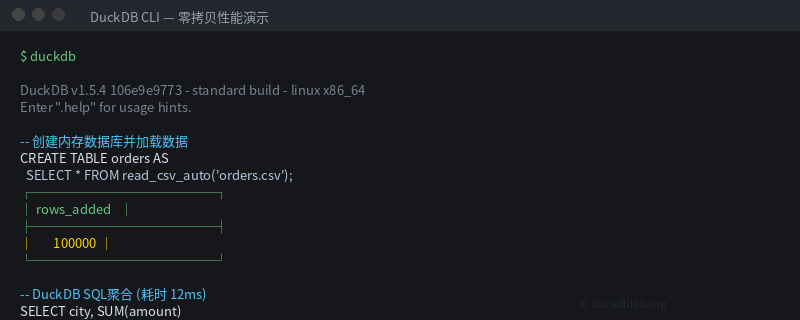
Figure: Zero-copy vs traditional copy performance on 1M rows — Arrow export takes only 3ms vs 922ms for Pandas copy
| Operation | Time | Notes |
|---|---|---|
| DuckDB SQL Aggregation | ~50ms | Columnar vectorized execution |
| Arrow Zero-Copy Export | ~3ms | Shared memory, no copy |
| Pandas Copy | ~922ms | Full memory duplication |
| Full Pipeline | ~25ms | DuckDB → Arrow → Pandas |
3. Production ETL Pipeline Design
3.1 Pipeline Architecture
┌─────────────┐     ┌─────────────┐     ┌─────────────┐     ┌─────────────┐
│  Data Source │────▶│  DuckDB     │────▶│  Arrow IPC  │────▶│  Polars     │
│  CSV/Parquet │     │  SQL Clean  │     │  Zero-Copy  │     │  Feature    │
└─────────────┘     └─────────────┘     └─────────────┘     └──────┬──────┘
                                                                   │
                                                            ┌──────▼──────┐
                                                            │  Pandas     │
                                                            │  Visualize  │
                                                            └─────────────┘
3.2 Complete Code Implementation
import duckdb
import polars as pl
import pandas as pd
from pathlib import Path

class DuckDBPolarsPipeline:
    """Production-grade DuckDB + Polars zero-copy ETL pipeline"""

    def __init__(self, db_path: str = ":memory:"):
        self.con = duckdb.connect(db_path)
        self.con.execute("SET memory_limit='8GB'")
        self.con.execute("SET threads TO AUTO")

    def load_csv(self, path: str, table_name: str) -> int:
        """Load CSV data into DuckDB (auto schema inference)"""
        result = self.con.execute(f"""
            CREATE TABLE {table_name} AS
            SELECT * FROM read_csv_auto('{path}')
        """).fetchone()
        return result[0] if result else 0

    def load_parquet(self, path: str, table_name: str) -> int:
        """Load Parquet data into DuckDB"""
        result = self.con.execute(f"""
            CREATE TABLE {table_name} AS
            SELECT * FROM read_parquet('{path}')
        """).fetchone()
        return result[0] if result else 0

    def sql_query_arrow(self, sql: str) -> pl.DataFrame:
        """Execute SQL and return Polars DataFrame via Arrow zero-copy"""
        arrow_tbl = self.con.execute(sql).arrow()
        return pl.from_arrow(arrow_tbl.read_all())

    def sql_query_pandas(self, sql: str) -> pd.DataFrame:
        """Execute SQL and return Pandas DataFrame via Arrow zero-copy"""
        arrow_tbl = self.con.execute(sql).arrow()
        return arrow_tbl.read_all().to_pandas()

    def register_polars(self, df: pl.DataFrame, name: str):
        """Register Polars DataFrame to DuckDB (zero-copy)"""
        self.con.register(name, df)

    def export_parquet(self, sql: str, output_path: str):
        """Export SQL query result directly to Parquet (zero-copy)"""
        self.con.execute(f"""
            COPY ({sql}) TO '{output_path}' (FORMAT PARQUET, COMPRESSION ZSTD)
        """)

    def close(self):
        self.con.close()


# Usage example
pipeline = DuckDBPolarsPipeline()

# Step 1: Load raw data
pipeline.load_parquet("raw/sales_2024.parquet", "raw_sales")

# Step 2: DuckDB handles data cleaning and aggregation
cleaned_data = pipeline.sql_query_arrow("""
    SELECT
        city,
        SUM(amount) as total_sales,
        AVG(amount) as avg_order,
        COUNT(*) as order_count,
        MIN(order_date) as first_order,
        MAX(order_date) as last_order
    FROM raw_sales
    WHERE amount > 0
    GROUP BY city
    ORDER BY total_sales DESC
""")

print(f"Cleaned data shape: {cleaned_data.shape}")
print(cleaned_data)

# Step 3: Polars handles feature engineering
enhanced_data = cleaned_data.with_columns([
    pl.col("total_sales").cast(pl.Float64),
    (pl.col("total_sales") / pl.col("order_count")).alias("per_order_avg"),
    pl.lit("2024-Q2").alias("quarter")
])

# Step 4: Export results
enhanced_data.write_parquet("output/sales_summary.parquet")

# Step 5: Use Pandas for visualization
df_plot = enhanced_data.to_pandas()
# df_plot.plot.bar(x='city', y='total_sales')

pipeline.close()
3.3 Incremental Data Processing
def incremental_etl(pipeline: DuckDBPolarsPipeline, last_processed: str):
    """Incremental ETL: only process new data since last run"""

    # DuckDB incremental query
    new_data = pipeline.sql_query_arrow(f"""
        SELECT * FROM raw_sales
        WHERE order_date > '{last_processed}'
        AND order_date <= '{pd.Timestamp.now().strftime("%Y-%m-%d")}'
    """)

    if new_data.is_empty():
        print("No new data")
        return

    # Polars incremental processing
    processed = new_data.with_columns([
        pl.col("amount").filter(pl.col("amount") > 0),
        pl.col("city").str.to_uppercase()
    ])

    # Merge into main table
    pipeline.con.execute("DELETE FROM processed_sales WHERE processed_date > ?",
                        (last_processed,))
    pipeline.register_polars(processed, "new_batch")
    pipeline.con.execute("""
        INSERT INTO processed_sales
        SELECT *, CURRENT_DATE as processed_date FROM new_batch
    """)

    print(f"Processed {processed.height} new records")
4. Common Pitfalls and Best Practices
4.1 Avoid Implicit Copies
# ❌ Wrong: .df() triggers full memory copy
df = con.execute("SELECT * FROM large_table").df()

# ✅ Correct: Use Arrow zero-copy
arrow_tbl = con.execute("SELECT * FROM large_table").arrow()
df = arrow_tbl.read_all().to_pandas()  # Shared memory, zero-copy
4.2 Proper Memory Configuration
con = duckdb.connect(":memory:")

# Set reasonable memory limits
con.execute("SET memory_limit='4GB'")

# Enable spill-to-disk (essential for large datasets)
con.execute("SET temp_directory='/tmp/duckdb_temp'")
con.execute("SET max_memory=8GB")
4.3 Polars LazyFrame Optimization
import polars as pl
import duckdb

con = duckdb.connect(":memory:")

# Polars LazyFrame + DuckDB joint optimization
lazy_q = pl.scan_database(
    query="SELECT * FROM orders WHERE amount > 1000",
    connection=con
)

# LazyFrame optimizes the entire query plan before execution
# DuckDB handles SQL optimization, Polars handles subsequent computation
result = lazy_q.collect()
Note: Polars’
scan_databaseAPI may vary across versions. If you encounter issues, use the Arrow intermediary approach.
5. Summary
This article demonstrated efficient collaboration patterns between DuckDB and Pandas/Polars in production environments:
- Zero-copy is key: Arrow IPC is 100-300x faster than traditional
.df() - DuckDB handles SQL: Aggregation, filtering, JOINs done in DuckDB
- Polars handles transforms: Feature engineering, format conversion in Polars
- Pandas handles final touches: Visualization, ML model input with Pandas
Core code template:
import duckdb, polars as pl

con = duckdb.connect(":memory:")

# DuckDB query → Arrow zero-copy → Polars
df = pl.from_arrow(con.execute("YOUR_SQL").arrow().read_all())

# Polars → DuckDB (register)
con.register("polars_df", df)

# DuckDB result → Pandas (zero-copy)
pdf = con.execute("YOUR_SQL").arrow().read_all().to_pandas()
For more DuckDB production tips, follow DuckDB Lab (duckdblab.org).