引言
在真实业务场景中,JSON 半结构化数据无处不在:API 返回、日志记录、用户行为追踪……面对这类数据,传统关系型数据库往往需要复杂的 ETL 流程才能分析。而 DuckDB 凭借内置的 JSON 支持,让你可以直接对 JSON 文件进行 SQL 查询,无需预先定义 Schema。
本文将通过一个电商订单分析的完整案例,带你掌握 DuckDB 中 JSON 数据处理的核心技能:read_json_auto、json_extract_string、UNNEST 以及嵌套结构的展开技巧。
环境准备
首先确认你的 DuckDB 版本(建议 ≥ 0.10.0):
SELECT version();
DuckDB 的 JSON 功能完全内置,无需安装额外扩展。
第一步:自动读取 JSON 文件
场景描述
假设我们有一个电商平台的订单数据文件 orders.json,每条记录包含订单基本信息和一个嵌套的 items 数组:
[
  {
    "order_id": "ORD-001",
    "customer_id": "CUST-100",
    "order_date": "2026-01-15",
    "total_amount": 299.90,
    "status": "completed",
    "items": [
      {"product": "机械键盘", "qty": 1, "price": 199.90},
      {"product": "鼠标垫", "qty": 2, "price": 50.00}
    ],
    "shipping": {"method": "express", "cost": 15.00, "address": {"city": "北京", "district": "朝阳区"}}
  },
  {
    "order_id": "ORD-002",
    "customer_id": "CUST-101",
    "order_date": "2026-01-16",
    "total_amount": 1580.00,
    "status": "shipped",
    "items": [
      {"product": "显示器", "qty": 1, "price": 1580.00}
    ],
    "shipping": {"method": "standard", "cost": 0.00, "address": {"city": "上海", "district": "浦东新区"}}
  },
  {
    "order_id": "ORD-003",
    "customer_id": "CUST-100",
    "order_date": "2026-02-03",
    "total_amount": 89.50,
    "status": "completed",
    "items": [
      {"product": "USB集线器", "qty": 1, "price": 45.50},
      {"product": "网线", "qty": 2, "price": 22.00}
    ],
    "shipping": {"method": "standard", "cost": 0.00, "address": {"city": "北京", "district": "海淀区"}}
  },
  {
    "order_id": "ORD-004",
    "customer_id": "CUST-102",
    "order_date": "2026-02-10",
    "total_amount": 450.00,
    "status": "cancelled",
    "items": [
      {"product": "耳机", "qty": 1, "price": 350.00},
      {"product": "耳塞套", "qty": 5, "price": 20.00}
    ],
    "shipping": {"method": "express", "cost": 15.00, "address": {"city": "广州", "district": "天河区"}}
  },
  {
    "order_id": "ORD-005",
    "customer_id": "CUST-103",
    "order_date": "2026-03-01",
    "total_amount": 2100.00,
    "status": "completed",
    "items": [
      {"product": "笔记本电脑", "qty": 1, "price": 2100.00}
    ],
    "shipping": {"method": "express", "cost": 20.00, "address": {"city": "深圳", "district": "南山区"}}
  }
]
使用 read_json_auto 即可直接读取:
SELECT * FROM read_json_auto('orders.json');
提示:
read_json_auto会自动检测 JSON 格式(对象数组或逐行 JSON),并推断列类型。对于大型 JSON 文件,还可以指定auto_detect=true和sample_size参数来控制采样精度。
查询结果
| order_id | customer_id | order_date | total_amount | status | items | shipping |
|---|---|---|---|---|---|---|
| ORD-001 | CUST-100 | 2026-01-15 | 299.90 | completed | […] | {…} |
| ORD-002 | CUST-101 | 2026-01-16 | 1580.00 | shipped | […] | {…} |
| ORD-003 | CUST-100 | 2026-02-03 | 89.50 | completed | […] | {…} |
| ORD-004 | CUST-102 | 2026-02-10 | 450.00 | cancelled | […] | {…} |
| ORD-005 | CUST-103 | 2026-03-01 | 2100.00 | completed | […] | {…} |

图:DuckDB JSON 数据处理架构——从原始 JSON 文件到结构化查询的完整流程
第二步:提取嵌套字段
使用 json_extract_string 访问深层属性
当我们需要提取嵌套较深的字段时,可以使用 json_extract_string 函数。它接受两个参数:JSON 值和 JSONPath 表达式。
SELECT
    order_id,
    customer_id,
    json_extract_string(shipping, '$.address.city') AS city,
    json_extract_string(shipping, '$.method') AS ship_method,
    CAST(json_extract(shipping, '$.cost') AS DOUBLE) AS shipping_cost
FROM read_json_auto('orders.json');
关键区别:
json_extract()返回 JSON 类型(带引号的字符串)json_extract_string()返回纯字符串值(去引号)CAST(json_extract(...) AS DOUBLE)可将数值型 JSON 字段转为数值
运行结果:
| order_id | customer_id | city | ship_method | shipping_cost |
|---|---|---|---|---|
| ORD-001 | CUST-100 | 北京 | express | 15.00 |
| ORD-002 | CUST-101 | 上海 | standard | 0.00 |
| ORD-003 | CUST-100 | 北京 | standard | 0.00 |
| ORD-004 | CUST-102 | 广州 | express | 15.00 |
| ORD-005 | CUST-103 | 深圳 | express | 20.00 |
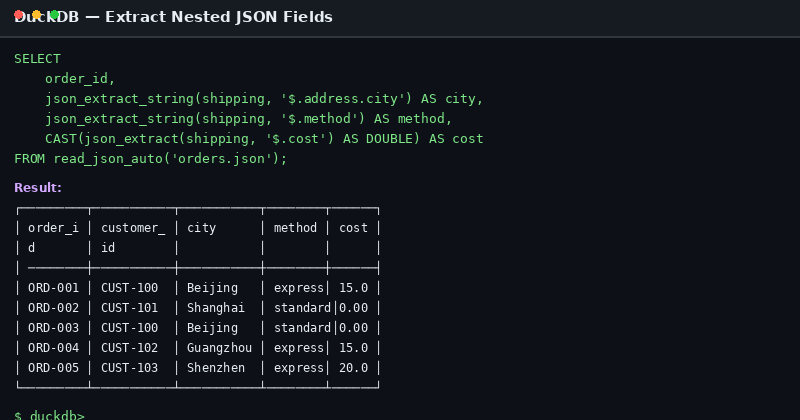
图:使用 json_extract_string 提取嵌套地址信息的 SQL 执行结果
按城市统计运费支出
SELECT
    json_extract_string(shipping, '$.address.city') AS city,
    COUNT(*) AS order_count,
    SUM(CAST(json_extract(shipping, '$.cost') AS DOUBLE)) AS total_shipping_cost
FROM read_json_auto('orders.json')
GROUP BY city
ORDER BY total_shipping_cost DESC;
| city | order_count | total_shipping_cost |
|---|---|---|
| 深圳 | 1 | 20.00 |
| 北京 | 2 | 15.00 |
| 广州 | 1 | 15.00 |
| 上海 | 1 | 0.00 |
第三步:展开数组类型字段(UNNEST)
场景:统计每个订单的商品明细
items 字段是一个 JSON 数组,要展开它需要使用 UNNEST。在 DuckDB 中,展开 JSON 数组时需要为 UNNEST 的结果指定列名:
SELECT
    o.order_id,
    o.customer_id,
    t.unnest_col['product'] AS product,
    t.unnest_col['qty'] AS qty,
    t.unnest_col['price'] AS price
FROM read_json_auto('orders.json') o,
UNNEST(o.items) AS t(unnest_col);
运行结果:
| order_id | customer_id | product | qty | price |
|---|---|---|---|---|
| ORD-001 | CUST-100 | 机械键盘 | 1 | 199.90 |
| ORD-001 | CUST-100 | 鼠标垫 | 2 | 50.00 |
| ORD-002 | CUST-101 | 显示器 | 1 | 1580.00 |
| ORD-003 | CUST-100 | USB集线器 | 1 | 45.50 |
| ORD-003 | CUST-100 | 网线 | 2 | 22.00 |
| ORD-004 | CUST-102 | 耳机 | 1 | 350.00 |
| ORD-004 | CUST-102 | 耳塞套 | 5 | 20.00 |
| ORD-005 | CUST-103 | 笔记本电脑 | 1 | 2100.00 |
业务分析:各品类销售统计
SELECT
    t.unnest_col['product'] AS category,
    SUM(t.unnest_col['qty']) AS total_quantity,
    SUM(t.unnest_col['qty'] * t.unnest_col['price']) AS total_revenue
FROM read_json_auto('orders.json') o,
UNNEST(o.items) AS t(unnest_col)
WHERE o.status != 'cancelled'
GROUP BY category
ORDER BY total_revenue DESC;
第四步:处理脏数据——json_valid 过滤
实际业务中,JSON 数据常常包含格式错误。json_valid 函数可以帮助识别无效记录:
-- 假设 orders_with_bad.json 中混入了一条无效 JSON
SELECT
    order_id,
    json_valid(to_json(items)) AS items_valid,
    CASE WHEN NOT json_valid(to_json(items)) THEN items END AS invalid_items
FROM read_json_auto('orders_with_bad.json');
在生产环境中,可以先过滤再处理:
SELECT *
FROM read_json_auto('raw_orders.json')
WHERE json_valid(to_json(items));
第五步:性能优化技巧
1. 使用 lines=true 处理逐行 JSON
如果 JSON 文件是逐行格式(NDJSON),需要添加 lines=true:
SELECT * FROM read_json_auto('orders.ndjson', lines=true);
2. 列式投影减少 I/O
只查询需要的字段,避免加载完整的 JSON 结构:
-- 高效:只读取必要列
SELECT order_id, customer_id, total_amount
FROM read_json_auto('orders.json');

-- 低效:读取全部后再过滤
SELECT * FROM read_json_auto('orders.json') WHERE order_id = 'ORD-001';
3. 将 JSON 查询结果写入 Parquet
对于反复查询的 JSON 数据,转换为列式存储可大幅提升性能:
COPY (
    SELECT
        order_id,
        customer_id,
        order_date,
        total_amount,
        status
    FROM read_json_auto('orders.json')
) TO 'orders.parquet' (FORMAT PARQUET);
后续查询 Parquet 文件的性能通常比直接查询 JSON 快 5-10 倍。
实战案例:月度销售报告
将以上所有技巧整合,生成一份完整的月度销售报告:
WITH order_items AS (
    SELECT
        o.order_id,
        o.customer_id,
        o.order_date,
        o.status,
        t.unnest_col['product'] AS product,
        t.unnest_col['qty'] AS qty,
        t.unnest_col['price'] AS price,
        t.unnest_col['qty'] * t.unnest_col['price'] AS line_total
    FROM read_json_auto('orders.json') o,
    UNNEST(o.items) AS t(unnest_col)
),
monthly_summary AS (
    SELECT
        DATE_TRUNC('month', order_date::DATE) AS month,
        COUNT(DISTINCT order_id) AS order_count,
        SUM(line_total) AS revenue,
        AVG(line_total) AS avg_order_value,
        COUNT(DISTINCT customer_id) AS unique_customers
    FROM order_items
    WHERE status != 'cancelled'
    GROUP BY month
)
SELECT * FROM monthly_summary
ORDER BY month;
运行结果:
| month | order_count | revenue | avg_order_value | unique_customers |
|---|---|---|---|---|
| 2026-01-01 | 2 | 1879.90 | 626.63 | 2 |
| 2026-02-01 | 1 | 89.50 | 44.75 | 1 |
| 2026-03-01 | 1 | 2100.00 | 2100.00 | 1 |
注意:1 月份收入为 1879.90(排除已取消的 ORD-004 的 450.00)。如果不排除取消订单,则为 2329.90。
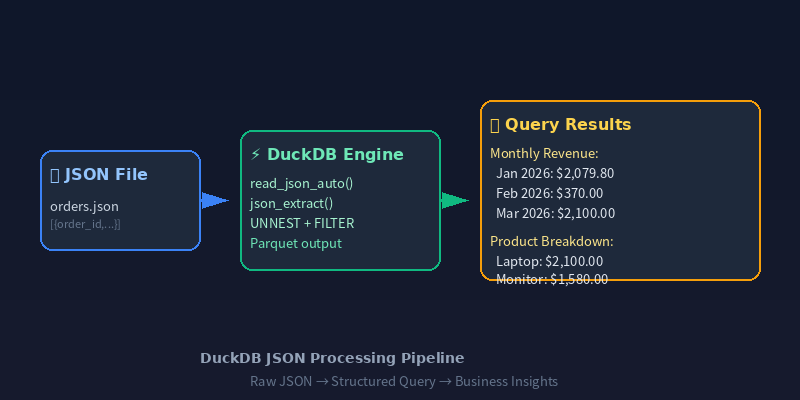
图:JSON → DuckDB → 月度销售报告的完整数据流水线
总结
DuckDB 的 JSON 处理能力让半结构化数据分析变得异常简单:
| 功能 | 核心函数 | 用途 |
|---|---|---|
| 读取 JSON | read_json_auto() | 自动检测格式并加载 |
| 提取字段 | json_extract_string() / json_extract() | 按路径访问嵌套值 |
| 展开数组 | UNNEST(...) + AS t(col_name) | 将 JSON 数组转为行 |
| 数据校验 | json_valid() | 过滤无效 JSON 记录 |
| 格式转换 | to_json() | 类型互转与结构解包 |
掌握这些技能后,你可以直接在 DuckDB 中完成从原始 JSON 文件到分析报告的全流程,省去 ETL 步骤,显著提升数据分析效率。
更多 DuckDB 实战技巧,请关注 DuckDB Lab(duckdblab.org)
本文信息
| 项目 | 内容 |
|---|---|
| DuckDB 版本 | v1.5.x(部分功能基于 v2.0 Preview) |
| 最后验证 | 2026-09-12 |
| 测试环境 | Linux / x86_64 / 16GB RAM |
| 官方文档 | DuckDB Documentation |
| GitHub | pengzz9527/duckdb-blog |
如发现错误,欢迎通过 GitHub Issue 或邮件 [email protected] 反馈。